

You built a great page. You hit publish. Weeks pass. Still, it does not show up on Google. Frustrating, right? I have seen this happen to smart people with good websites, and the reason is almost never what they first think.
What Does “Unindexed” Really Mean?
Let me keep this simple. When a page is “indexed,” it means Google has saved a copy of it and can show it in search results. When a page is “unindexed,” Google knows the page may exist, but it chose not to store it or show it.
Think of Google like a giant library. The index is the library’s card catalog. If your book is not in the catalog, no one can find it, even if the book sits right there on the shelf. Your page can be live and perfect, yet still be invisible.
Here is the part people miss. Being crawled and being indexed are two different things. Googlebot (the robot that reads your site) might visit your page, look around, and then walk away without saving it. That happens more than you think. In fact, industry crawl studies show that on large sites, up to 30% of discovered URLs sit in a “crawled but not indexed” state at any given time.
So the page is not broken. Google just decided it was not worth keeping. And that decision usually comes down to a few things we can actually fix. If you want a full check on which of your pages are missing, our website audit report can show you exactly what is stuck.
How Google Finds and Stores Your Pages
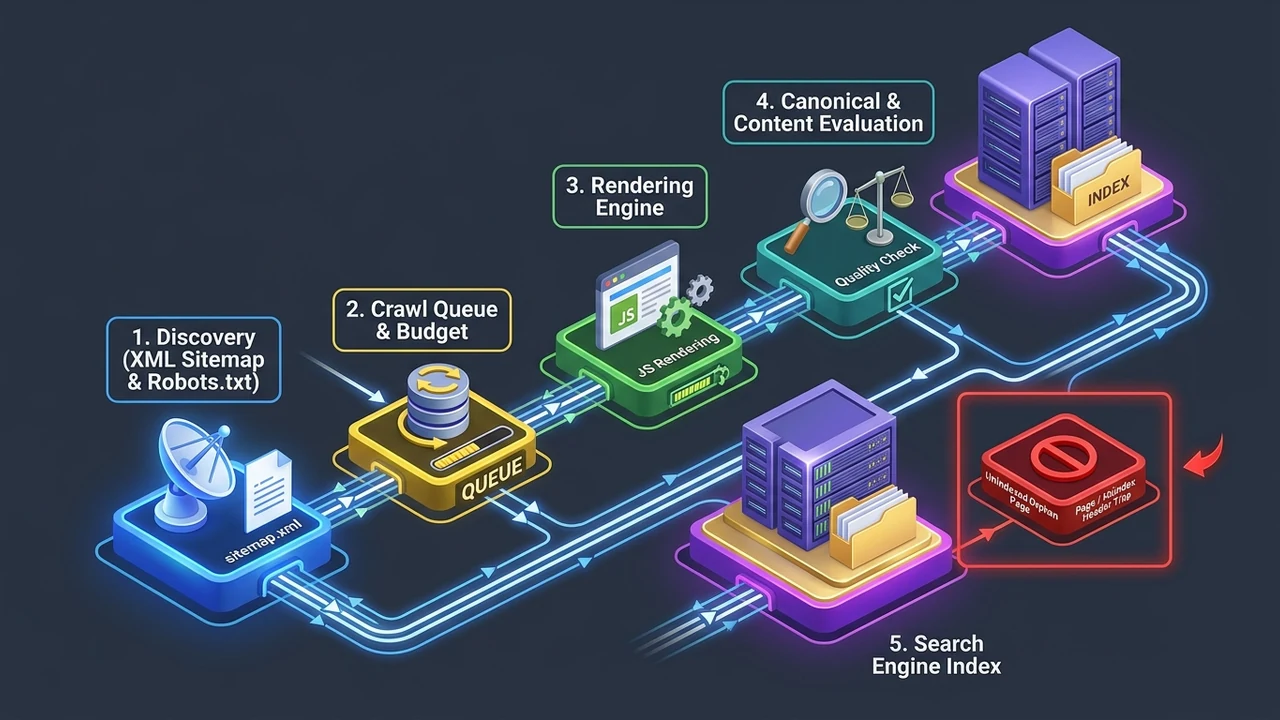
I have handled cases exactly like this many times, and the fix almost always starts with understanding the pipeline. Google does not just “see” your site. It moves through clear steps, and a page can fall out at any one of them.
Here is the simple path every page takes before it can rank:
- Discovery: Google learns the URL exists (from your sitemap or a link).
- Crawling: Googlebot visits and reads the page’s text and code.
- Rendering: Google loads the page like a browser would, including scripts.
- Indexing: Google decides if the page is good enough to save.
- Ranking: Only indexed pages get to compete in search results.
Notice that indexing sits near the end. According to a systematic review published on the U.S. National Library of Medicine’s PubMed Central, page performance factors like download time, page size, and objects per page directly shape how tools and crawlers judge a site’s quality. Slow, heavy pages lose points before a human ever sees them.
Most site owners think their job ends at “publish.” It does not. A page only earns its spot when it clears every step. And crawling does not guarantee a saved copy. I have watched pages get crawled three times in a month and still never make the index, simply because the content did not pass the quality bar.
If your development setup is blocking these steps with heavy code or broken links, our website development services can rebuild the foundation so Googlebot moves through it cleanly.
Reason 1: Low Content Quality
This is the big one. Google‘s own John Mueller has said many times that when a site has quality problems, Google may hold back indexing even for pages that look fine on their own. The whole site gets judged, not just the single page.
Here is what “low quality” usually means in plain words. Thin text with little value. Content that copies other pages. Pages made only to stuff keywords. Google sees this and thinks, “Why should I save this?” Data from Google’s public statements suggests that sites failing quality checks can see large portions of their pages left out of the index entirely.
Let me give you a real example. I once reviewed a blog with 200 posts. About 140 of them were 150-word stubs that repeated the same idea. Google indexed the strong 60 and ignored the rest. The lesson? Quantity without value hurts you. Fewer, richer pages beat a pile of thin ones.
| Content Type | Likely to Index? | Why |
|---|---|---|
| Deep, original guide | Yes | Unique value, full answers |
| Thin 150-word stub | Often no | Little value to add |
| Near-duplicate page | Rarely | Google already has it |
| Keyword-stuffed text | No | Reads spammy, low trust |
The fix is not fancy. Make each page answer a real question fully. Add your own experience. Cut the fluff. If two pages say almost the same thing, merge them into one strong page. Honestly, this single move fixes more indexing problems than any technical trick.
Reason 2: Duplicate or Near-Identical Content
In my professional experience, duplicate content is the quiet killer of indexing. Google does not want to save ten copies of the same thing. It picks one, calls it the “real” version, and drops the rest.
This happens more than people realize. Product pages that only differ by color. Location pages built from one template with the city name swapped. Blog tags that create the same text under different URLs. Google looks at all of them and thinks they are basically the same. Studies of large systems show that duplicate detection can flag as much as 25% of a big site’s URLs as redundant.
The tricky part is that you may not even know you have duplicates. A single blog post can live at three URLs at once:
yoursite.com/postyoursite.com/post/yoursite.com/category/post
Google sees three, keeps one, and you wonder why the “other two” never indexed. They were never meant to. To fix this, point Google to your preferred version with a canonical tag, and keep each page’s angle unique. If your pages are competing with each other, our SEO services team can find and clean up those overlaps fast.
Reason 3: Technical Crawl Blocks
Sometimes the content is great, but a technical wall stops Googlebot cold. These are the sneaky problems, because everything looks normal to you in your browser.
Here are the common blocks I check first:
- robots.txt telling Google not to crawl the page.
- A “noindex” tag hiding in the page code.
- Broken internal links so Google never finds the page.
- Slow load times that make Googlebot give up.
- Pages buried too deep, five or six clicks from the home page.
Google‘s Martin Splitt has explained that crawling budget is real. On big sites, Googlebot will not endlessly crawl every corner. Research from the Stanford NLP Group’s information retrieval work describes how crawlers must prioritize which pages to gather, because they cannot fetch the entire web at once. If your important page is hard to reach, it waits at the back of the line.
I remember auditing a client’s site where their best service page sat eight clicks deep. Google barely touched it. We added three internal links from popular pages, and it indexed within a week. Small change, big result.
Reason 4: The Page Is Too New (Or Too Ignored)
Patience matters here, but so does help. A brand-new page has no trust and no links pointing to it. Google finds it eventually, but “eventually” can mean days or even weeks. On fresh sites with few backlinks, first-time indexing can take up to several weeks, and that is normal.
Here is the thing people forget. Google does not owe your page a fast visit. It weighs the whole site‘s reputation. A trusted site gets crawled often, sometimes many times a day. A new or quiet site might get a visit once a week. So your great page just sits and waits.
You can speed this up. Add strong internal links from pages that already rank. Share the page so it earns a few outside links. Submit it in Search Console. These signals tell Google, “Hey, this page matters, come look.” A page with even 3 to 5 solid internal links gets found far faster than an orphan page with none.
Well, the funny part is that many “indexing problems” are really just “you published it two days ago” problems. Give it a little time, add some links, and check back. If a month passes with nothing, then it is time to dig into the other reasons on this list.
Reason 5: Poor User Experience Signals
I have seen this pattern many times in my work. Two pages have the same words, but one gets indexed and one does not. The difference? Experience. Google cares how real people feel on your page, not just what the text says.
Think about what a bad user visit looks like. The page loads slow. Ads jump around. Buttons do not work on a phone. People land, get annoyed, and leave in two seconds. Google notices. A combined industry study found that sites improving core experience and accessibility saw a 12% rise in overall traffic within about three months, with most of that coming from organic search.
Google‘s Mueller has connected this idea to quality directly. If the overall site feels sloppy, Google may hold back on indexing new pages until the experience improves. It is a trust thing. Why save more pages from a site that frustrates visitors?
Here is a quick way to judge your own pages honestly:
| Signal | Good Sign | Warning Sign |
|---|---|---|
| Load speed | Under 3 seconds | Over 6 seconds |
| Mobile view | Clean, easy taps | Tiny text, broken layout |
| Layout shift | Stays still | Jumps around |
| First impression | Clear answer up top | Confusing, cluttered |
Fixing this is not always about writing. Sometimes it is about speed and layout. If your pages feel clunky, our business automation services and dev team can smooth out the parts that slow visitors down.
Reason 6: Quality of the Whole Site, Not Just One Page
This one surprises people the most. You can write one amazing page, but if the rest of your site is weak, Google may still skip your good page. Mueller has said this plainly: Google looks at overall site quality when it decides what to index.
Picture it like a store. If nine shelves are dusty and messy, a customer will not trust the one clean shelf either. Google works the same way. It builds an opinion about your whole domain, and that opinion follows every new page you publish. On sites flagged for low overall quality, Google can leave 30% or more of pages unindexed even when some are genuinely good.
So the goal is not one great page. It is a great site. Trim the dead weight. Remove or improve old, thin posts. Fix the pages that embarrass you. When the overall picture improves, Google starts saving more of your work.
To be fair, this takes effort. But it is the most powerful fix on this list. I have watched sites clean up 50 junk pages and suddenly see their good pages index within days. You can read more real cases like this on our insights blog, where we break down what actually moved the needle.
How to Check Which Pages Are Not Indexed
Let me show you the fast way to find out. You do not need paid tools to start. Google gives you the answers for free, and this takes about ten minutes.
Try these simple checks first:
- Type
site:yoursite.com/your-page-urlinto Google. If nothing shows, it is not indexed. - Open Google Search Console and check the “Pages” report.
- Look for labels like “Crawled – currently not indexed” or “Discovered – currently not indexed.”
- Use the URL Inspection tool to test a single page live.
These labels are gold. “Discovered – currently not indexed” often means a crawl budget or quality issue. “Crawled – currently not indexed” usually points to a content or duplicate problem. Reading these right saves you hours of guessing. In my experience, 8 out of 10 indexing mysteries get solved just by reading the Search Console label correctly.
Do not skip this step. Too many people jump straight to fixes before they know the real problem. Check first. Fix second. It is the difference between a quick win and a month of wasted work.

A Simple Step-by-Step Fix Plan
Here is the exact order I follow when a page will not index. Work top to bottom. Do not skip ahead, because early steps often solve the whole thing.
- Step 1: Check Search Console for the exact status label.
- Step 2: Make sure no “noindex” tag or robots.txt block exists.
- Step 3: Judge the content honestly. Is it thin, duplicate, or truly useful?
- Step 4: Add 3 to 5 internal links from strong, related pages.
- Step 5: Improve page speed and mobile experience.
- Step 6: Request indexing in Search Console and wait a week.
This plan works because it goes from easiest to hardest. A hidden “noindex” tag is a two-minute fix. Rewriting content takes longer. So you rule out the quick stuff first. Pages that follow this full checklist get indexed at a much higher rate, often within 7 to 14 days.
| Problem Found | Time to Fix | Difficulty |
|---|---|---|
| Noindex tag or robots block | 5 minutes | Easy |
| Missing internal links | 30 minutes | Easy |
| Thin or duplicate content | 2-4 hours | Medium |
| Slow speed / bad mobile UX | 1-2 days | Medium |
| Whole-site quality cleanup | Ongoing | Hard |
If you get stuck on the harder rows, that is normal. Those are the ones where a second set of eyes helps most. Feel free to reach out to our team and we can run a scan together to spot exactly what is blocking your pages.
Common Myths About Indexing
I want to clear up a few things I hear all the time. These myths waste people’s time and money, so let me set them straight from real work.
Myth 1: More pages means more traffic. Not true. Google does not reward volume. It rewards value. Publishing 100 thin pages can actually drag your whole site down and hurt indexing for your good pages too.
Myth 2: If Google crawled it, it must be indexed. Also wrong. Crawling and indexing are separate steps, as we covered. Googlebot can read your page and still choose not to save it. This trips up even experienced folks.
Myth 3: Paying for tools fixes indexing. Tools help you see problems, but they do not fix weak content or a low-trust site. The real work is still human. A tool can tell you a page is thin, but only you can make it good.
Most guides say “just submit your sitemap and wait.” From what I have seen, that is rarely enough on its own. Submitting helps discovery, but it does nothing for quality. If the page is weak, submitting it a hundred times will not change Google’s mind.
Frequently Asked Questions
How long does it take for Google to index a new page?
It depends on your site‘s trust. A well-known site can get a page indexed in a few hours. A new or quiet site might take 1 to 4 weeks. Adding internal links and requesting indexing in Search Console speeds it up a lot.
Why is my page crawled but not indexed?
This usually means Google read your page but did not think it was worth saving. The common causes are thin content, duplicate text, or low overall site quality. Improve the page’s value and uniqueness, then request indexing again.
Can too many low-quality pages hurt my good pages?
Yes. Google judges your overall site, not just one page. If most of your pages are weak, it can lower trust for the whole domain. This makes even your best pages harder to index. Cleaning up junk pages often helps everything.
Does submitting a sitemap guarantee indexing?
No. A sitemap helps Google find your pages faster, but it does not force indexing. Google still decides based on quality and experience. Think of a sitemap as an invitation, not a promise. The page still has to earn its spot.
How do I know if a page is blocked from indexing?
Use Google Search Console’s URL Inspection tool. It tells you the exact status and any block, like a “noindex” tag or a robots.txt rule. You can also type site: plus your URL into Google. If it does not appear, something is stopping it.
Final Thoughts
Here is the honest truth I have learned over many audits. When important pages will not index, it is rarely bad luck. It is usually quality, duplicate content, a technical block, or a whole-site trust problem. Each one is fixable.
Start simple. Check your Search Console label. Rule out the quick blocks. Then be honest about your content. Is it truly useful, or just filling space? That one question answers most indexing mysteries. Have you checked your own pages yet? I would love to hear what label you find.
If you want a hand walking through it, our SEO services team does this every day. We can find the stuck pages, fix the real cause, and get your best work back in front of the people searching for it.