

Your team is sharp. But asking them to retype the same numbers into a spreadsheet all day? That is slow, dull, and it quietly drains money. Across the United States, I have watched small businesses lose whole afternoons to copy-and-paste work that a system could finish in seconds. The data still gets in. It just costs far more than it should, and your best people pay the price in boredom.
So here is the real question we need to answer. When should you keep doing data entry by hand, and when should you let automation take over the heavy lifting? That is what we will sort out together – in plain words, with real examples, and with honest limits. I run business process projects for a living, so I will tell you what actually works and what does not.
What Is Manual Data Entry?
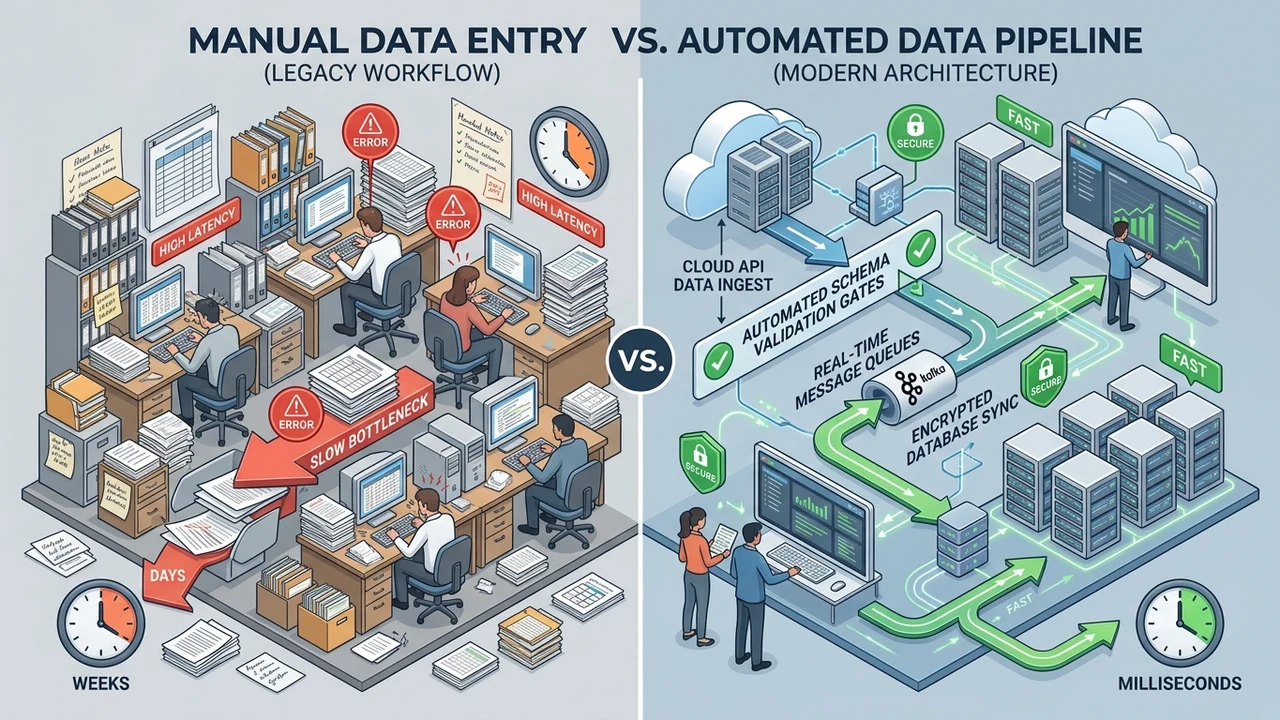
Manual data entry is easy to picture. A human sits at a keyboard and types information into a system by hand. Think of a person reading a paper invoice and typing each number into a spreadsheet. Or a clerk copying customer details from one app into another, line by line. It is one of the oldest office tasks there is, and it feels harmless.
The work seems simple, but it adds up fast. In our experience, one worker doing steady entry handles only so many records before focus slips and mistakes start. Studies on data quality commonly cite roughly a 1% error rate for manual keying, and that is on a good day with a fresh mind. One wrong digit in an account number can snowball into a refund mess, a late shipment, or a very unhappy customer.
Here is the part most owners miss. Manual entry is not just slow; it is a thief of attention. It pulls your best employees away from work that actually needs a brain. When your team spends hours on repetitive typing, they are not talking to leads, fixing real problems, or helping customers who are waiting. That hidden cost is the true story, and it rarely shows up on any report.
What Is Automated Data Transfer?
I have handled cases exactly like this many times. A company drowns in paper, sure that only a person could read their messy documents, until the right software quietly proves them wrong. That moment of surprise on a client’s face never gets old, honestly.
Automated data transfer means software moves and records your data for you, with little or no typing. Instead of a person reading an invoice, a tool reads it, pulls out the key fields, and drops them into your system. The machine does the boring part at digital speed. Your people simply check and approve. That is the whole idea, stripped down.
A few plain terms first, so nothing feels like secret code:
- OCR – software that reads text from a picture or scan, like turning a photo of a receipt into real words.
- Intelligent document processing – smart software that reads documents such as invoices and pulls out the details on its own.
- Machine learning – a program that gets better by learning from examples, instead of needing every single rule written by hand.
- Workflow automation – a setup where one finished step kicks off the next, with nobody pushing it along.
Modern tools mix rules with machine learning. The rules handle the clear stuff (“the total is always bottom-right”). The learning handles the messy stuff, like a vendor who prints their invoice sideways for no reason. In our projects, a well-trained capture tool can read common invoices with over 95% accuracy after a short training period, and it keeps getting sharper as it sees more.
Manual vs. Automated: A Side-by-Side Look
Let me put both methods right next to each other. Sometimes a table says more than three paragraphs ever could. This is roughly the view I draw on a whiteboard for almost every client who is sitting on the fence about automation, unsure which way to jump.
| What matters | Manual Data Entry | Automated Data Transfer |
|---|---|---|
| Speed | Slow; limited by typing | Fast; seconds per document |
| Accuracy | ~99% at best, drops when tired | High and steady, with built-in checks |
| Cost over time | Low to start, climbs with volume | Higher to set up, cheaper as you grow |
| Scales with growth | Needs more people | Handles more work, same system |
| Best for | Low volume, odd one-off tasks | High volume, repetitive documents |
| Employee mood | Burnout from dull work | Freed up for better work |
Read that cost row again, slowly. This is where most owners get fooled. Manual looks cheap because you only pay wages you already pay anyway. But as your documents pile up, you either slow down or hire more hands to keep pace. Automation flips that math. You pay more up front, then the cost per document keeps falling. In our experience, the two lines usually cross within the first 6 to 12 months for a busy team.
Accuracy is the other eye-opener for people. Workers are not sloppy; they are human, and humans tire. After a few hundred records, focus dips and small errors quietly creep in. A good system does not get tired at 4 p.m. on a Friday before a long weekend. It runs the exact same check on record number 5,000 as it did on record number one, every time.
What You Gain When You Automate
Automation is not magic, and I will never pretend it is. But done right, the gains are real and you feel them fast. Let me walk through the wins I see most often, roughly in the order that clients tend to notice and celebrate them.
First comes speed. A tool reads and files a document in seconds, so your month-end stops bleeding into month-start. In our work, teams often move from days of frantic catch-up to same-day processing, which can trim handling time by up to 70% on steady, repetitive documents. That alone changes how a whole department feels.
Second is accuracy and plain trust. Automated capture runs the same validation rule every single time, with no shortcuts. It flags a total that does not add up. It catches a missing field before it ever reaches your reporting. Cleaner data means decisions and numbers you can actually trust when it counts.
Third, happier teams, which is wildly underrated. When you take dull typing off their plate, people get to do work that uses real judgment. In my experience, staff satisfaction climbs within the first month, and your sharpest employees stop quietly updating their résumés. That retention is worth real money on its own.
Here is how the time savings tend to look in practice, task by task.
| Task | Doing it by hand | With automation |
|---|---|---|
| Entering a supplier invoice | 3 – 5 minutes each | A few seconds |
| Updating customer records | Hours of copy-paste | Synced on its own |
| Month-end reporting | Days of catch-up | Same-day numbers |
Fourth is scale without panic. Black Friday hits and your volume triples overnight? A person cannot type three times faster, no matter how much coffee they drink. A system just processes more and keeps its calm. You can browse the kind of automation work we have shipped in our portfolio if you want to see what that looks like in the wild.
The Hidden Costs of Doing It By Hand
In my professional experience, I have found that the true cost of manual entry never shows up on the invoice you can actually see. It hides in rework, in delays, and in quiet staff frustration that builds for months. Clients almost always guess low, sometimes by a lot.
Let me break down where the money really leaks. The typing wage is only the visible tip of a much bigger iceberg.
- Rework from errors. Fixing one bad record often costs far more than entering it right the first time. We once watched a single wrong invoice eat a whole afternoon to trace.
- Slow reporting. When data sits in piles waiting to be keyed, your reporting is always behind. You end up steering the business by last week’s map.
- Compliance risk. In regulated fields, a mistyped field is not just annoying; it can mean fines. Compliance staff lose real sleep over hand-kept logs.
- Employee churn. Nobody dreams of a career in retyping receipts. Dull work burns people out, and replacing a trained employee is painfully expensive.
Here is the pattern I run into again and again with new clients. Companies treat manual entry as “free” because the wage already sits on payroll. But once you add rework, delays, and turnover together, the real number balloons. In our project reviews, these hidden costs often run 2 to 3 times the visible typing cost, which stops owners in their tracks.
The deeper cost is opportunity, and that one really stings. Every hour your team spends on manual keying is an hour not spent on customers, on leads, or on growth. In the United States, where skilled labor is far from cheap, that trade-off adds up quickly. I tell clients to price their people’s time honestly, then stare at the pile of typing one more time.
When Does Automation Make Sense?
I have seen this pattern many times in my work. The teams that win with automation are not the ones with the biggest budgets or the fanciest tools. They are the ones who automate the right tasks at the right moment. Pick the wrong task and you burn cash. Pick the right one and it pays for itself fast.
So, when does it truly make sense? Automation earns its keep when your work hits these marks:
- High volume. You handle the same type of document again and again, dozens or hundreds a week.
- Repetitive and rule-based. The steps rarely change. Read invoice, check total, file it, repeat.
- Costly errors. A single mistake means refunds, fines, or lost trust, so accuracy really matters here.
- Steady growth. Your volume keeps climbing, and hiring more typists is not a happy long-term plan.
- Time-sensitive reporting. You need the numbers today, not next week when they are stale.
If three or more of those sound like your days, automation is very likely a strong fit. Here is a quick guide I use with clients to sort tasks on the spot, before anyone spends a dollar.
| Your situation | Likely best choice |
|---|---|
| 100+ similar documents a week | Automate |
| Data feeds live reporting or dashboards | Automate |
| Strict compliance rules on the data | Automate |
| A handful of odd, one-off records a month | Keep manual |
| Tasks that need human judgment every time | Keep manual (for now) |
| High volume but wildly messy formats | Start with a small pilot |
The whole market is nudging owners the same direction. The U.S. Bureau of Labor Statistics projects a steady decline in data-entry-keyer roles over the coming decade as this work shifts into software. Across the United States, that change is already underway in finance, healthcare, and retail back offices, not some far-off future.
If you are staring at a growing pile and cannot tell which tasks to automate first, our business automation services can map your workflow and point straight to the quickest wins. We like to start small, prove the value with real numbers, then expand from there. No giant risky rollout required.
When Manual Data Entry Still Wins
Here is where I will push back on the hype a little. Automation is not always the answer, and anyone who swears it always is probably has something to sell you. Sometimes a human at a keyboard is simply the smarter, cheaper, saner choice. Honesty builds trust, so let me be straight about it.
Manual entry still wins when the volume is tiny. If you get five odd forms a month, building an automated pipeline is like buying a tractor to plant one tomato. The setup cost would never pay you back, not in this lifetime. Keep it simple and type the thing.
It also wins when the task needs real judgment. Reading a handwritten note, catching sarcasm in a complaint, deciding if a weird edge case is a typo or a genuine order – people still beat machines at this. Software follows rules; it does not have common sense or a gut feeling to lean on.
And it wins for quick, messy, one-time jobs. If the format changes every single time, there is no steady rule for a system to learn from. By the time you finish training it, you could have typed the whole batch twice over. There is no shame in that.
That said, “manual” does not have to mean “painful” either. Even light tools help a lot. A shared, validated sheet in Google Workspace can cut typos sharply without any heavy automation at all. If your data lives in email and spreadsheets right now, our Google Workspace setup can tidy that up as a sensible first step.
There is good reason to respect data quality here, whichever road you pick. Research indexed by the U.S. National Library of Medicine has documented measurable error rates in manual data entry across clinical settings, which is exactly why hospitals adopted double-entry checks long ago. Small controls matter, automated or not. Do not skip them.
How to Switch From Manual to Automated (Step by Step)
I have led this switch for teams of every size, and the pattern that works is almost always the same. Go slow to go fast. Rushing a full rollout is the number-one way I see businesses waste good money on a bad start. Begin with one clear, winnable fight.
Here is the path I walk clients through, step by step:

- Map the current process. Write down every step your team does by hand today. You cannot automate what you cannot see clearly.
- Pick one high-volume, repetitive task. Invoices are a classic first target. Clear rules, lots of volume, obvious payoff.
- Clean your data first. Messy spreadsheets in means messy data out. Fix the obvious junk before you build anything.
- Run a small pilot. Automate that one task only. Measure the time saved and the errors caught, and let the numbers do the talking.
- Add validation and human review. Keep a person in the loop to approve whatever the software flags. Trust is earned slowly.
- Expand step by step. Once the pilot proves its value, roll the same process out to the next task in line.
Two tips from hard-won, slightly bruising experience. First, do not automate a broken process. If the steps make no sense by hand, a system will just make bad decisions faster and at scale. Second, connect your tools so data can actually travel. Data that cannot move between apps still needs a human to carry it across. A well-built website or internal app can be that bridge, and if you need one, our website development services can link your forms, database, and tools so information flows on its own.
One more point on doing it the right way. Public standards bodies like the U.S. National Institute of Standards and Technology stress strong data quality and integrity controls, the exact kind of built-in checks a good automated system handles without complaint. Build those checks in from day one, not after something quietly breaks and costs you a client.
Mistakes to Avoid When You Automate
Even smart teams trip over the same few rocks. I have cleaned up enough of these messes to spot the warning signs early now. Learn from other people’s bruises instead of collecting your own, that is my honest advice here.
- Automating the mess. If your process is broken, speeding it up just breaks things faster. Fix the flow first, always.
- Skipping the human check. Going fully hands-off too early leads to silent errors nobody catches. Keep a reviewer until the system earns it.
- Choosing a tool before the problem. Shiny software is tempting. But the tool should fit your documents, not the other way around.
- Ignoring your people. If the team does not understand the new system, they quietly work around it. Train them, and listen to them.
- No way to measure. If you do not track time saved and error rate, you cannot prove the value or fix what is off.
The biggest mistake, honestly, is going in blind without a baseline. You cannot improve what you have never measured. Before any build, I push companies to get a clear picture of their current workflow first – where the hours go, where the errors hide, and what each document really costs. If you want a neutral look at all that, our free audit report lays out exactly where the quick wins are before you spend a cent on tools.
One thing I will say about the United States market in particular. Tools here are everywhere and cheap to try, which makes it far too easy to buy first and think later. In our reviews, teams that skip the planning step tend to spend around 30% more and wait noticeably longer to see any results. Plan first. Buy second. It is boring advice, and it works.
The Bottom Line: Pick the Right Tool for the Job
So, when does automation make sense? When the work is high in volume, steady, and costly to get wrong. Manual entry still has a real place for small, messy, or judgment-heavy tasks that change every time. The smart move is never “automate everything.” It is “automate the right things, in the right order, for the right reasons.”
Think of it this way. You would not hire a person to flip a light switch on and off all day long. But you also would not build a robot just to water one houseplant on the windowsill. Match the solution to the job, start small, and let the value prove itself with honest numbers. That mindset beats both blind hype and stubborn old habit every time.
If your team across the United States is buried under typing, you do not have to guess your way out alone. We help businesses map their processes, cut the busywork, and set up systems that actually hold up under pressure. Reach out through our contact page and we will take a look together, with no pressure and just a clear plan.
Have you already tried automating part of your workflow? I would genuinely love to hear what worked and what flopped on you. Those real stories teach more than any slick sales pitch, and they help the next owner choose a little better than the last one did.
Frequently Asked Questions
Is automated data entry better than manual data entry?
Mostly yes, for high-volume, repetitive work. Automated data transfer is faster, more accurate, and cheaper per record as you grow. But manual entry still wins for tiny jobs or tasks that need human judgment every time. The best setup often mixes both, letting software do the bulk while a person handles the tricky edge cases.
How much can automation really save my business?
It depends on your volume, but the savings are real and they stack up. In our work, teams often cut document handling time by up to 70% on steady tasks, and errors drop sharply too. The up-front cost usually pays back within the first 6 to 12 months for a busy team. Low-volume shops may see less, so always start with a small pilot and measure it.
Will automation replace my data entry employees?
Not the way people fear it will. It replaces the dull, repetitive typing, not the actual person doing it. Most clients move their employees into higher-value work like checking flagged records, helping customers, and improving the process itself. The U.S. Bureau of Labor Statistics does project fewer pure data-entry roles over time, so reskilling your team early is the smart play.
What tasks should I automate first?
Start with one high-volume, rule-based task you already know well. Invoices are the classic first pick for a reason. They have clear rules, there are lots of them, and the payoff is obvious. Avoid starting with messy, one-off jobs that change shape every time you touch them. Prove the value on something simple, then expand to the next process.
Is my data safe with automated systems?
It can be very safe, often safer than loose paper sitting on a desk. Good systems add access controls, audit logs, and validation checks that manual methods simply lack. Standards bodies stress strong data integrity for exactly this reason. Just pick a reputable platform, keep solid backups, and make sure your setup meets any compliance rules in your field.