

In nearly every mid-market and enterprise organization, Monday morning leadership meetings begin with the same hidden tax on productivity: manual reporting assembly. Operations analysts, marketing managers, and finance controllers spend Friday afternoons and Monday mornings exporting CSV files from Salesforce or HubSpot, downloading ad spend reports from Google Ads and Meta, pulling fulfillment tables from Shopify or NetSuite, and pasting tens of thousands of rows into fragile multi-tab Excel or Google Sheets workbooks.
By the time the executive dashboard is finally distributed, the metrics are already forty-eight hours stale, a single broken VLOOKUP or mismatched timezone has distorted conversion attribution, and high-paid specialists have burned dozens of billable hours acting as human copy-paste connectors. Learning how to automate business reporting when data lives across multiple systems transforms fragmented software silos into a unified, real-time single source of truth.
In this data engineering guide, Inceptial Tech outlines the complete blueprint for building automated, fault-tolerant cross-platform reporting pipelines – from API extraction and schema normalization to cloud data warehousing and executive BI visualization.
Why Multi-System Business Reporting Breaks Down
Connecting a single SaaS tool to a native dashboard is simple. The architectural challenge begins when meaningful business KPIs – such as Customer Acquisition Cost (CAC) to Lifetime Value (LTV), Net Margin per SKU after Ad Spend, or Sales Pipeline Velocity to Cash Collected – require joining records that live across three or four disconnected platforms.
1. Incompatible Entity Keys and IDs Across Silos
Your CRM identifies a customer by an internal contact_id and email address, your Stripe or QuickBooks billing system tracks them by a customer_cus_id, and your analytics platform tracks anonymous session cookies and UTM parameters. Without an automated identity-resolution layer that normalizes and joins these keys in a central database, cross-system reporting is impossible without manual spreadsheet matching.
2. Timezone, Currency, and Attribution Window Discrepancies
Ad platforms may report daily spend in UTC or account-local time, while your e-commerce database logs orders in Unix timestamps and your accounting ledger closes transactions on settlement dates three days later. Manual exports inevitably mix timezone boundaries, causing revenue and cost numbers to disagree across departments.
3. API Pagination and Rate Limits on Direct BI Connections
Many teams attempt to connect visualization tools like Looker Studio or Power BI directly to live SaaS APIs. As historical data grows past 50,000 rows, live API connectors time out, hit 429 rate-limit errors, and take two minutes to render a single chart filter.
The Modern 4-Layer Architecture for Automated Multi-System Reporting
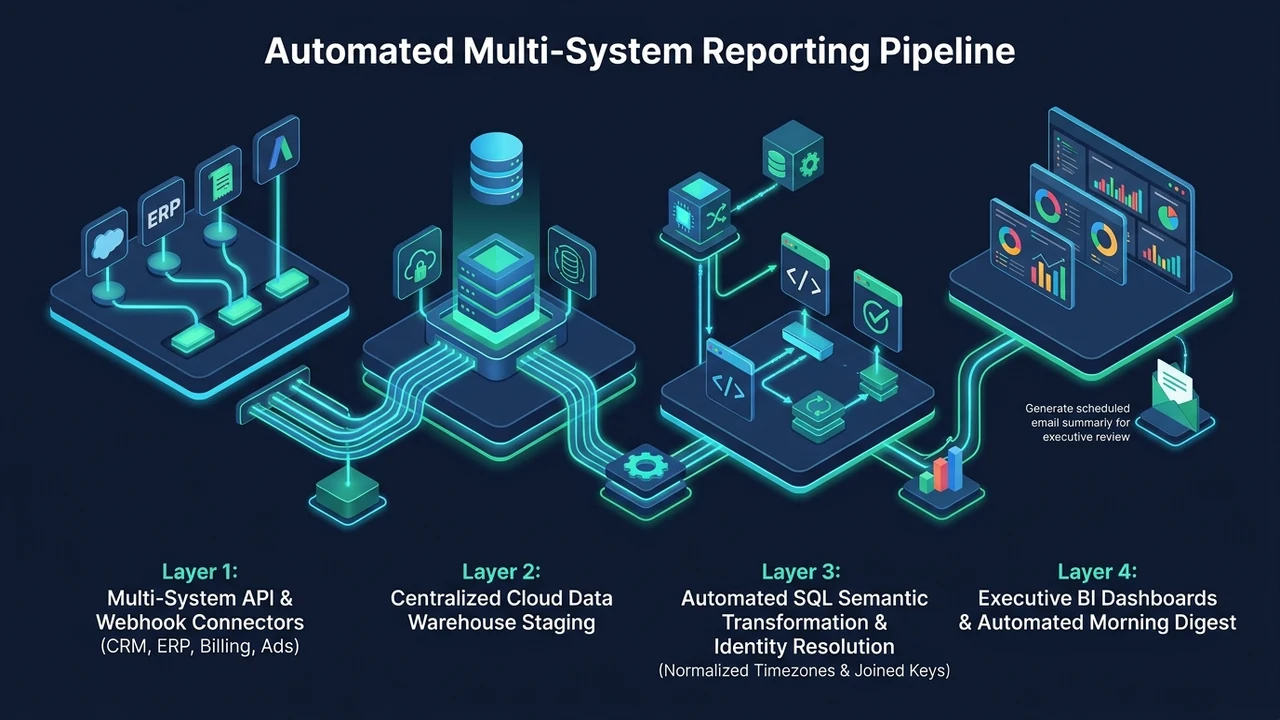
To eliminate manual spreadsheets permanently and achieve sub-second dashboard performance, modern data engineering separates data collection from data visualization across four structured layers:
Layer 1: Automated Ingestion (ELT / Custom API Connectors)
Instead of humans downloading CSVs, automated scheduled workers extract raw records from every source system via REST, GraphQL, or webhooks on an hourly or 15-minute cadence. For standard SaaS tools (HubSpot, Salesforce, Stripe, Google Ads, Shopify), managed ELT pipelines or custom Python microservices handle OAuth token rotation, cursor-based pagination, incremental updated_at syncs, and dead-letter retry queues.
Layer 2: Centralized Cloud Data Warehouse (Staging & Storage)
All raw JSON and tabular payloads land in a unified cloud data warehouse – such as Google BigQuery, Snowflake, or a dedicated PostgreSQL / Supabase analytical replica. Storing raw historical snapshots in a central warehouse costs mere dollars per month while providing an immutable audit trail and decoupling your dashboards from sluggish third-party SaaS APIs.

Layer 3: Data Transformation & Semantic Modeling (SQL / dbt)
Once raw tables from all systems reside in the same database, automated SQL transformation pipelines clean, deduplicate, and join the data into clean “Gold Layer” business tables:
- Standardizing all timestamps to a single corporate timezone (e.g.,
America/New_YorkorUTC). - Resolving customer identities across CRM emails, phone hashes, and billing IDs.
- Pre-calculating standardized executive metrics (MRR, Churn Rate, Blended ROAS, Gross Margin, Technician Utilization) so every department queries the exact same mathematical definition.
Layer 4: Automated BI Dashboards & Proactive Slack/Email Alerts
Business intelligence tools (Looker Studio, Power BI, Tableau, Metabase, or custom React portals) query the pre-joined warehouse tables directly, rendering millions of rows in milliseconds. Furthermore, automated anomaly-detection scripts push a daily morning digest directly to leadership in Slack or email – highlighting exact KPI movements and flagging anomalies automatically.
Step-by-Step Roadmap to Transition Off Manual Spreadsheets
- Audit Your Core KPIs & Source Truths: Document the 10 to 15 metrics leadership actually uses to make decisions, and designate which software platform is the authoritative source of truth for each entity (e.g., QuickBooks for recognized revenue, HubSpot for pipeline stage).
- Map the Common Join Keys: Identify or create the shared foreign keys (such as passing the CRM
deal_idinto the Stripe metadata payload or ERP invoice field) so systems link deterministically. - Deploy Automated Warehouse Syncs: Replace manual CSV exports with scheduled incremental API ingestion into BigQuery or PostgreSQL.
- Implement Automated Data Quality Assertions: Configure automated schema tests that alert engineering if a source API returns null revenue values or duplicate primary keys before executives ever open the dashboard.
Frequently Asked Questions
Can we still use Google Sheets or Excel if our finance team prefers spreadsheet interfaces?
Yes. With a centralized data warehouse, your finance team can use Connected Sheets for BigQuery or automated two-way SQL syncs. The data warehouse populates the clean, joined metrics into Google Sheets automatically every morning at 6:00 AM – eliminating manual CSV imports while preserving familiar pivot table workflows.
How long does it take to automate cross-system reporting for 4 to 5 business tools?
A production-grade automated reporting pipeline connecting 4 to 5 core platforms into a unified warehouse and executive dashboard is typically engineered, validated against historical accounting numbers, and deployed within 2 to 4 weeks.