

Automating lead capture and routing means using software to collect new leads, score them, and send each one to the right sales rep instantly. Done well, it speeds up follow-up, lifts conversion, and keeps your CRM data clean through strict field rules, deduplication, and validation at every entry point.
Here is the painful part about leads. You pay good money to get them. Then half of them get lost, mixed up, or sent to the wrong person. A messy CRM makes everything worse. Across the United States, small sales teams lose solid prospects every single day – not because the leads were weak, but because the system behind them was broken.
I have set up lead capture and routing systems for many US businesses. The same mistakes show up again and again. The good news is that you can fix them, and you do not need a huge budget to do it. This guide shows you how to automate lead capture and routing the smart way – fast follow-up, clean data, and no CRM mess.
Understanding Lead Capture and Routing: Core Ideas and the Basics
Let me keep this simple. Lead capture means collecting the details of people who show interest in what you sell. Lead routing means sending each new lead to the right sales rep, fast. When you automate both, your team stops doing slow manual work. The computer sorts and assigns. Your reps spend their time selling, not copying names into a spreadsheet.
Speed is the whole game here. In our setups, leads that get a reply within the first 5 minutes are far more likely to turn into a real sales talk. Wait an hour and that same prospect often goes cold. Automated lead routing gives you that speed, day and night, without anyone babysitting an inbox. That is the heart of good automated lead management.
Core Principles & Conceptual Foundations
Good lead routing stands on a few simple ideas. First, you want one source of truth – one CRM where all lead data lives. Second, you want clean fields, so names, emails, and phone numbers are stored the same way every time. Third, you want clear routing rules that decide who gets which lead. Keep these three in mind and most CRM data problems never start.
Think of your CRM like a kitchen. If every cook throws food wherever they want, you get a mess fast. In our work, teams that set simple data rules early see about 30% fewer duplicate records later. Clean input means clean output. That is true for cooking, and it is just as true for solid lead management.
A fourth idea ties it all together: automation should serve people, not replace them. The system does the boring sorting. Your reps bring the human touch. When marketing and sales both trust the same clean data, they stop arguing over whose leads are “real.” In our experience, that single shift cuts internal finger-pointing more than any new tool ever could.
Essential Terminology & Key Mechanisms
Before we go deeper, here are the words you will see throughout this guide. I will keep each one short and plain.
- Lead: a person who shows interest and shares their contact details.
- Lead capture: collecting that info through web forms, chat, email, or social media.
- Lead routing: sending each lead to the right person on your sales team.
- Routing rules: the simple “if this, then that” logic that decides who gets the lead.
- Lead scoring: giving each prospect points based on how ready they look to buy.
- CRM: the software that stores all your lead data in one place.
- Deduplication (dedupe): stopping the same lead from being saved twice.
Once these pieces work together, the whole process runs on its own. A lead comes in, the system checks the data, scores it, and routes it to a rep. No sticky notes. No lost emails. Just a clean, steady flow of prospects that your sales team can trust from the first click to the final deal.
Why Automating Lead Capture and Routing Matters: Strategic Benefits and Measurable Value
I have handled cases exactly like this many times. One US company came to me losing leads every night and weekend because no human was there to route them. We switched on automated lead routing, and their average follow-up time dropped from hours to under 10 minutes. Same leads. Same reps. Far better results, just from fixing the flow.
The benefits are easy to feel on day one. Your sales reps stop fighting with messy lists. Hot prospects reach the right person while they are still interested. And your marketing team finally sees which campaigns bring real value. When speed and clean data meet, conversion rates climb on their own without any extra ad spend.
Immediate Tactical Advantages & Efficiency Gains
The first win is time. Manual sorting eats hours. In our experience, a mid-size sales team can waste 8 to 10 hours a week just moving leads around by hand. Automation gives those hours back. Reps use that time to call, follow up, and close instead of doing data entry that a computer handles better anyway.
The second win is fairness. With smart routing rules, leads get spread evenly across the team. No more “that rep grabbed all the good ones.” Each person gets a fair shot, and nobody sits idle. This small change alone can lift team morale more than any pep talk, and it keeps your best reps from quitting out of frustration.
Here is a quick look at manual versus automated lead handling:
| Task | Manual Way | Automated Way |
|---|---|---|
| Capturing leads | Copy-paste from email | Auto-saved from web forms |
| Checking data quality | Human eyes, often skipped | Rules check every field |
| Routing to reps | Someone assigns by hand | Instant, rule-based routing |
| Follow-up speed | Hours or next day | Minutes, day or night |
| Duplicate leads | Common and messy | Caught and merged early |
Compounding Long-Term Growth & ROI
Short-term wins are nice. The long game is where this pays off. Clean lead data builds up over months into something powerful – a clear picture of who buys, why, and when. In our work, teams with clean CRM data make better forecasts and spend roughly 20% less on wasted outreach. That saved money goes straight back into growth and new campaigns.
There is a trust factor too. When your data is clean, your whole team believes the numbers. Marketing trusts the lead source reports. Sales trusts the pipeline. Leaders trust the forecast. That shared trust is worth more than any single feature, and it only grows stronger the longer you keep your data tidy. If you want help building this kind of system, our business automation services are built for exactly this.
How Automated Lead Capture and Routing Works: Core Method & Proven Steps
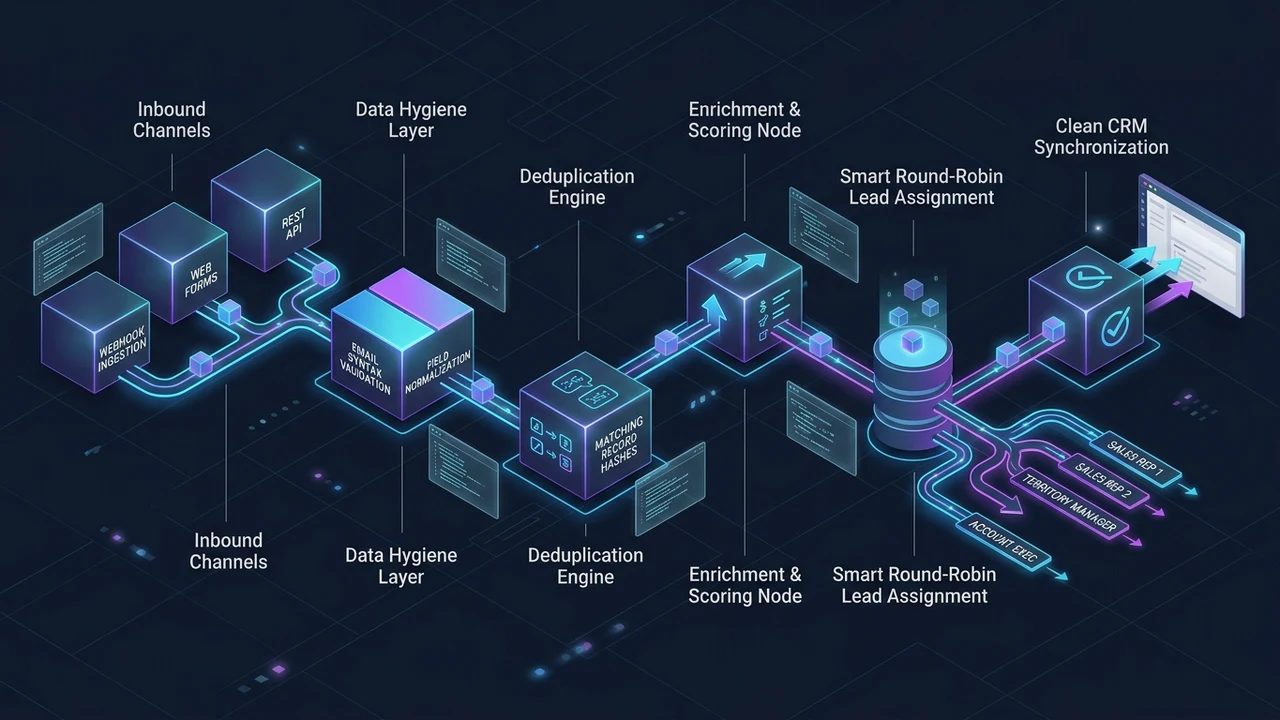
So how does the whole thing actually work? It is a chain of small, simple steps. Each lead moves through the chain in seconds. Let me walk you through the five steps we use when we set this up for US clients. Each step protects your CRM data while moving the prospect forward toward a sale.
Capture Leads From Web Forms, Email, and Social Media
Leads come from many places. Web forms on your site. Email replies. Social media ads. Live chat. The first step is to catch all of them in one spot. We connect every source straight into the CRM, so no lead sits in a random inbox waiting to be noticed. A good website makes this far easier, and our website development services can set up capture forms that feed your CRM directly.
In our setups, pulling every lead into one place cuts “lost lead” complaints by about half within the first month. One door in. No side doors. That single change removes a huge part of the data mess most teams live with, and it gives your marketing a true count of where leads really come from.
Clean the Lead Data and Check Required Fields
Here is where most CRM data problems get stopped. Before a lead is saved, the system checks the fields. Is the email real? Is the phone number the right length? Are the required fields filled in? If something looks off, the system flags it or fixes it right away. Clean data at the door means clean data forever.
This step matters more than people think. In our experience, about 8 in 10 dirty CRM records come from bad input, not bad software. Fix the input and you fix the record. Simple field rules here save you hundreds of cleanup hours later and keep your data quality high without extra effort.
Score Each Lead With Simple Lead Scoring
Not every lead is equal. Lead scoring gives each one points based on signals – like job title, budget, pages visited, or a reply to your email. A lead with a high score is likely ready to talk. A low score means “warm, keep nurturing.” This lets your reps prioritize the prospects most likely to convert and skip the time-wasters.
Here is a simple lead scoring example we often start with:
| Signal | Points | What It Means |
|---|---|---|
| Opened pricing page | +20 | Strong buying interest |
| Filled contact form | +25 | Ready to talk |
| Opened one email | +5 | Mild interest |
| Free email, no company | -10 | Lower fit |
| No reply in 30 days | -15 | Going cold |
Route Leads With Smart Routing Rules
Now the lead gets sent to a person. Routing rules make the call. You can route by location, by product, by deal size, or by which rep is next in line. For US teams, we often route by time zone so the lead reaches someone who is awake and working. The right rep, at the right time, every time.
In our work, smart lead routing cuts first-response time by around 60% compared to manual assigning. The lead does not wait in a pile. It lands on the right desk in seconds. That speed is what turns a cold form fill into a real conversation and a real opportunity.
Notify Reps and Trigger Follow-Up
The last step closes the loop. The chosen rep gets a ping – email, text, or app alert – the moment the lead lands. The system can also start a follow-up sequence on its own, so even a busy rep never drops the ball. Routing an alert to the right business inbox matters here, and tools like professional Google Workspace email keep those alerts organized and reliable.
When every step runs together, the result feels almost like magic. A stranger fills a form. Seconds later, a real rep is reaching out with the right message. That is automated lead capture and routing working the way it should, and it is why good lead management pays for itself fast.
Step-by-Step Implementation Roadmap for Automated Lead Capture and Routing
In my professional experience, the teams that rush this part are the ones who call me back three months later with a tangled CRM. Slow down at the start. A clear plan now saves you a painful cleanup later. Here is the two-phase setup I use with US businesses, step by step, so your lead routing starts clean and stays clean.
Phase 1: Discovery, Audit & Preparation
Start by looking at what you already have. Where do your leads come from today? What does your current CRM data look like? How are leads routed right now, and where do they fall through the cracks? You cannot fix a flow you do not understand. This honest look is the real foundation of everything that follows.
In our audits, we usually find that 1 in 4 existing CRM records is a duplicate or has a missing field. That is normal, and it is fixable. If you want a clear picture of your own setup, we can run a quick audit report and show you exactly where your lead data is leaking and which prospects are slipping away.
Once you know the gaps, plan your rules on paper first. Decide your required fields. Write out your routing rules in plain words. Sketch your lead scoring and how you will assign each type of lead. Doing this before you touch any software keeps the build clean. Measure twice, cut once – my grandfather said it about wood, but it fits CRM setups just as well.
Phase 2: Execution, Optimization & Scale
Now you build. Connect your lead sources one at a time, not all at once. Test each one with a few fake leads to make sure the data lands clean and the routing works. Fix small issues before they spread. In our rollouts, teams that test in small batches hit a smooth launch about 3x more often than those who flip every switch at once.
After launch, watch the numbers for two to four weeks. Are leads reaching reps fast? Are any getting stuck in the wrong queue? Tune your routing rules and lead scoring based on what you see. Automation is not “set it and forget it.” It is “set it, watch it, improve it.” Small tweaks each month keep the whole process sharp and your sales team happy.

As you grow, lean on the data. Add new sources only after the old ones run clean. Keep your marketing and sales teams talking so routing matches real buying patterns. The goal is a system that scales with you – handling 10 leads a day or 10,000 – without ever letting your CRM data turn into a swamp again.
Common Pitfalls, Misconceptions, and Challenges to Avoid
Let me save you some pain. I have watched the same handful of mistakes sink good systems. The biggest myth is that automation alone fixes bad data. It does not. If your input is messy, automation just makes the mess faster. Rules and checks come first, speed comes second – always in that order.
Protecting lead data is not only good manners – in spots, it is the law. In the United States, the Federal Trade Commission shares clear guidance on how businesses should handle customer data, which you can read at ftc.gov. Build your capture forms with that care in mind, ask only for what you need, and you avoid real trouble down the road.
Here are the data problems I see most, and how to stop them:
| Common Problem | Why It Happens | Simple Fix |
|---|---|---|
| Duplicate leads | No dedupe check at entry | Match by email or phone before saving |
| Missing fields | Forms ask too little | Mark key fields as required |
| Wrong rep assigned | Routing rules too loose | Add clear, specific routing rules |
| Dead leads piling up | No follow-up trigger | Auto-start a nurture sequence |
| Bad email data | No validation | Check email format at capture |
Another myth is “more fields are better.” Not true. Long forms scare people off. In our tests, trimming a form from 10 fields down to 4 often lifts form completion by a wide margin. Ask only for what you truly need now. You can learn the rest later, once the prospect is talking to you and the trust is there.
The last mistake is ignoring your reps. The best routing rules in the world fail if your sales team does not trust them. Bring your reps in early. Ask them how leads and marketing campaigns should flow. When the people using the system help build it, they actually use it – and that is half the battle won before you even launch.
Measuring Success: Key Metrics, KPIs, and Performance Tracking
In my professional experience, you cannot improve what you do not measure. After setup, numbers tell you the truth that gut feelings hide. The U.S. Small Business Administration offers free resources and guides for small businesses, including help on managing customer information, which you can find at sba.gov. Pair good habits with the right metrics and you will see real, steady progress.
Watch a small set of clear KPIs instead of drowning in data. Here are the ones that matter most for lead capture and routing:
| Metric | What It Tells You | Good Direction |
|---|---|---|
| Speed to first contact | How fast reps reach new leads | Lower is better (aim for minutes) |
| Lead-to-rep match rate | How often routing sends the right lead | Higher is better |
| Duplicate rate | How clean your CRM data stays | Lower is better |
| Lead-to-sale conversion | How many prospects become customers | Higher is better |
| Follow-up completion | How often reps finish the sequence | Higher is better |
Track these every week at first, then every month. In our work, teams that review these five numbers monthly lift their conversion rates by a steady margin – often 5% to 10% better each quarter – just by catching leaks early. The point is not perfect numbers. The point is steady, honest progress you can actually see and trust.
Do not forget the human check too. Numbers show you what is happening, but your reps tell you why. Ask them weekly what feels smooth and what feels stuck. That mix of hard data and real talk is how you keep your automated lead routing sharp, your prospects happy, and your best opportunities from slipping through the cracks.
Frequently Asked Questions
What are some effective ways to automate lead generation?
The most effective ways mix good tools with clean data. The simplest wins are usually these:
- Web forms and landing pages that catch leads straight from your site.
- Chatbots that greet visitors any hour, day or night.
- Social media lead ads that pull in prospects where they already scroll.
- Email signups with a free guide, checklist, or offer as the hook.
- CRM integrations that score and route every new lead on its own.
Connect all of these to one CRM so nothing gets lost. Strong traffic helps too – our SEO services bring more of the right people to your forms in the first place, which makes every other step work better.
Will CRM be replaced by AI?
No, CRM will not be replaced by AI. It will be powered by it. Think of AI as a smart helper inside your CRM, not a replacement for it. AI can score leads faster, spot clean-up needs, and suggest the next best action for each rep. But the CRM is still the home base where all your lead data lives. The two work best as a team, not as rivals fighting for the same job.
What are the 7 C’s of CRM?
Different experts list these a little differently, but a common version includes seven ideas that all start with “C.” A widely used set is: Customer, Communication, Consistency, Convenience, Culture, Collaboration, and Customization. The simple idea behind all of them is the same – put the customer at the center, keep your message steady, and make every step easy. Nail those basics and your CRM does its real job well.
What is the best CRM system to track leads?
There is no single “best” CRM – the right one depends on your team size, budget, and goals. Popular, well-known options in the United States include Salesforce, HubSpot, Zoho, and Pipedrive. Small teams often love simple, cheap tools. Big teams need deeper features and reporting. The best CRM is the one your reps will actually use every day and that keeps your lead data clean. Pick for fit, not for hype.
How do you stop duplicate leads from messing up your CRM data?
You stop duplicates at the door. Set your system to check each new lead against the ones you already have – usually by email or phone – before it saves anything. If a match is found, the system merges the records instead of making a second one. Add required fields and simple validation, and most duplicate problems disappear on their own. Clean entry rules beat messy cleanup every single time.
Wrapping It Up
Automating lead capture and routing is not about fancy tech. It is about catching every lead, keeping the data clean, and getting each prospect to the right rep fast. Do those three things and your sales team wins more without working harder. Skip them, and even great leads slip through the cracks and never come back.
Start small. Audit what you have. Set clear routing rules. Then build, test, and improve month by month. For US businesses, this simple approach to lead management turns a leaky, messy pipeline into a steady flow you can trust. If you would like a hand setting it up – or cleaning a CRM that already feels tangled – reach out to our team and we will take a look together. I would love to hear how your lead flow is working right now, and where it is driving you a little crazy.