You want a new feature on your website. You have two doors in front of you. One door is a ready-made plugin you can install in minutes. The other door is custom code, built just for you. Both doors can work. But picking the wrong one can cost you months of stress and real money.
I’ve helped many businesses stand at this exact spot. In fact, about 8 out of 10 owners I meet start with plugins and never think past them. Some stay happy for years. Others hit a wall and wish they had gone custom sooner. This guide shows you when each choice makes sense, so you know which door to open for your own site.
What Is Off-the-Shelf vs. Custom Website Functionality?
Let me keep this simple. Off-the-shelf plugins are ready-made tools. Someone else already built them. You install one, click a few buttons, and it works. Custom development is different. Here, a developer writes code just for your business, so it fits your exact needs and not everyone else’s.
What “off-the-shelf plugins” really means
Think of a plugin like a tool you grab off a store shelf. It is a commercial product made for many people at once. A contact form, a booking calendar, a photo slider – these are all plugins. You get fast access and a low cost at the start, but you also share the same software with thousands of other user accounts.
What “custom development” really means
Custom work is made to order. A developer builds a feature around your workflow, your data, and your own rules. It takes more time at the start. In return, you get full control and true ownership. Nobody else runs the exact same application as you do.
| Point | Off-the-Shelf Plugin | Custom Development |
|---|---|---|
| What it is | Ready-made tool you install | Code designed only for you |
| Cost to start | Low or free | Higher upfront |
| Who owns it | The vendor | You / your company |
| Setup time | Minutes to hours | Weeks |
| Fits your workflow | Mostly, not fully | Exactly |
| Control over changes | Limited | Full |
Why Most Businesses Start With Plugins (And Why That’s Smart)
I’ve handled cases exactly like this many times. A new company has a small budget and needs a site up fast, so reaching for plugins is the right first move – not a weakness. You save cash and go live quickly.
Plugins win early for good reasons. They are cheap. They are fast. And someone else handles the hard parts. In our own work, roughly 9 out of 10 small sites launch on plugins first, and most run fine for the first 2 to 3 years. That is smart money at the start.
Here is why plugins make sense when you begin:
- Low upfront cost – many are free, and paid ones cost a small subscription.
- Fast setup – you can add a feature the same day.
- Built-in support – the vendor gives you updates and fixes.
- No coding needed – your team needs little training to use them.
- Low risk – if one plugin fails, you swap it for another.
So plugins are not the enemy. They are a great starting point. The problem shows up later, when your business grows past what a shared tool was ever designed to do. That is the exact moment this whole decision gets real.
The Hidden Costs of Off-the-Shelf Plugins
Plugins look cheap. On the surface, they are. But the real cost hides under the hood, and it grows quietly over the long-term. I have watched a “free” plugin turn into a big bill once you add up every renewal, fix, and lost hour.
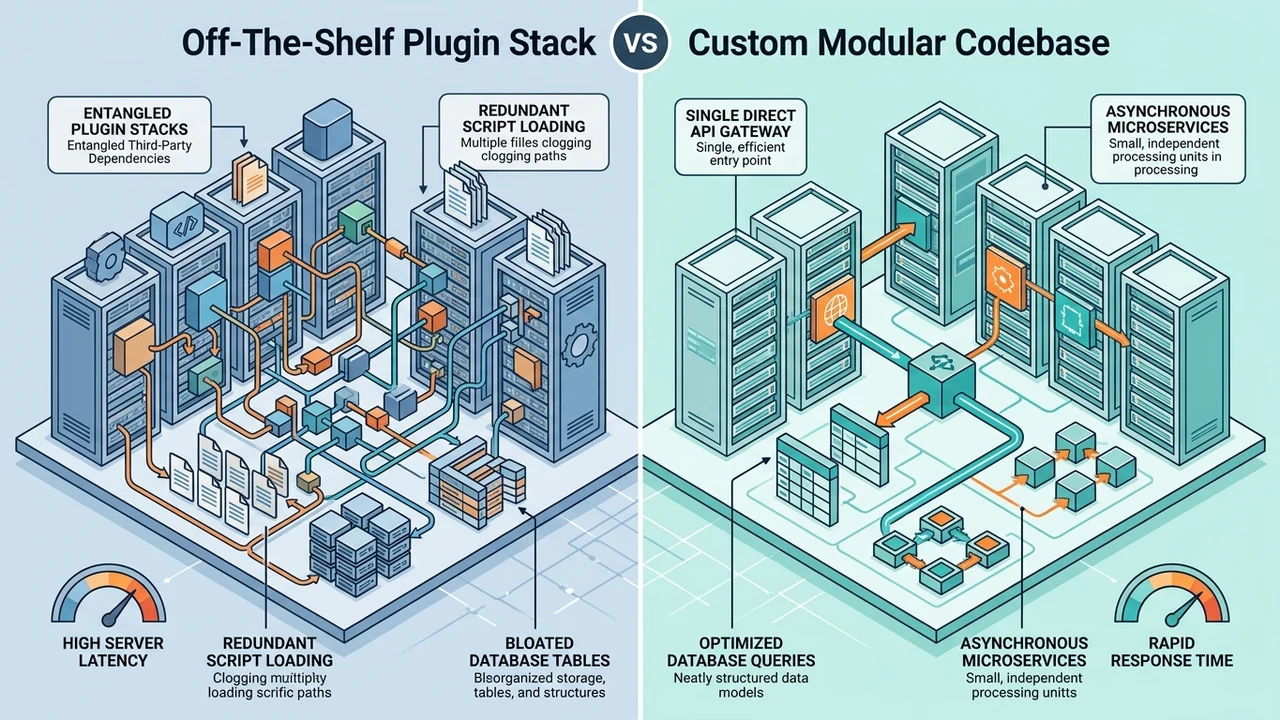
The first hidden cost is subscription creep. One plugin is cheap. But most sites end up running 20 to 30 of them. Each one renews every year. Add them up, and your costs can quietly pass what a small custom build would have been.
Then come plugin fights. Two plugins want the same job, and your site breaks. Speed drops too. Every extra plugin adds code, and heavy code slows your pages. Even a 1 second delay can push visitors to leave before they buy.
| Hidden Cost | What Happens | Why It Hurts |
|---|---|---|
| Subscription creep | Many plugins renew each year | Bills stack up fast |
| Plugin conflicts | Two tools fight, site breaks | Lost hours and sales |
| Bloat and slow speed | Extra code slows pages | Visitors leave early |
| Forced changes | Vendor drops or changes support | Sudden rebuild risk |
| Limited fit | Tool bends your workflow | Daily friction for employees |
There is one more trap: migration pain. When a vendor shuts down or changes its rules, you must move your data out fast. That switch is rarely smooth. If your plugins keep fighting each other, we can run a quick site check through our free audit report and show you exactly what is slowing things down.
When Is Custom Development Actually Justified?
In my professional experience, custom work pays off the moment a plugin starts shaping your business instead of your business shaping the tool. When you bend your daily workflow to fit a product, that is your sign. The tool should serve you, not the other way around.
Not every site needs custom code. Far from it. But when the fit gets bad enough, building your own feature saves money and headaches down the road. In our builds, about 7 out of 10 clients who switch to custom do it because plugins could not handle their unique workflows.
Signs you have outgrown plugins
- You pay for many plugins just to copy one simple idea in your head.
- Your employees waste time on manual work a plugin cannot automate.
- You need deep integrations with your existing systems, like a CRM or billing.
- Your data is unique, and no commercial tool stores it the way you need.
- Plugin conflicts break your site more than a few times a year.
Signs a plugin is still fine
- Your needs are common, like a basic contact form or blog.
- You have a small budget and need to launch fast.
- A trusted vendor already gives strong support and updates.
- You do not need special control over how the feature behaves.
When your daily workflows get unique, that is where a custom build shines. Our business automation services can wire your tools together so your team stops doing the same task by hand. That is often where custom work saves the most time.
Custom vs. Off-the-Shelf: A Side-by-Side Look
Let me put both choices next to each other. This is the view I share with clients when they cannot decide. Seeing it side by side makes the decision clearer. In my experience, this simple table settles the debate faster than an hour of talking.
| Factor | Off-the-Shelf Plugins | Custom Development |
|---|---|---|
| Upfront cost | Low | High |
| Long-term cost | Grows with subscriptions | Flatter over time |
| Control | Limited | Full |
| Ownership | Vendor holds the keys | You hold the keys |
| Security | Shared, wide target | Smaller, private target |
| Fits unique needs | Rarely perfect | Built to fit |
| Time to launch | Fast | Slower |
| Scaling up | Hits limits | Grows with you |
Read the table by your stage, not by the price tag alone. A brand-new shop should lean left, toward plugins. A growing organization with unique workflows should lean right. About 6 in 10 of the companies we help end up in the middle, using a smart mix of both.
The trick is honesty about your future. If you plan to stay small, plugins are fine forever. If you plan to grow and add integrations, paying more now for custom code can save you a painful rebuild later. The right decision depends on where you are headed, not just where you are today.
Real Business Cases: Plugin or Custom?
I’ve seen this pattern many times in my work. The same feature can be a cheap plugin for one business and a must-build custom job for another. It all depends on how central that feature is to how you make money.
Take a simple booking form. A dentist can use an off-the-shelf plugin and be happy for years. But a clinic with five locations, shared staff, and its own billing rules will outgrow that plugin fast. The same idea, two very different answers.
Now think about your checkout. Online selling is a big deal now. The U.S. Census Bureau reported that e-commerce made up 17.1 percent of all U.S. retail sales in the second quarter of 2026, up 12.2 percent from a year earlier. When your checkout is your main money-maker, a custom flow that fits your customer can be worth every dollar.
Here is how the same feature splits by need:
- Booking: Plugin for a small shop. Custom for multi-site staff and rules.
- Checkout: Plugin for a few products. Custom for large stores with special pricing.
- Integrations: Plugin for one app. Custom when you tie many systems together.
- Automation: Plugin for basic tasks. Custom when employees repeat complex work daily.
The lesson is simple. Ask how close the feature sits to your core money. The closer it is, the more a custom build starts to make sense. Far from the money, a plugin is almost always the better call.
Ownership, Control, and Security Over the Long Run
In my professional experience, the biggest surprises are not about launch day. They come two years later, around ownership, security, and upkeep. This is the part most owners forget when they only stare at the upfront price.
Start with security. Plugins are a shared, wide target, so hackers study the popular ones hard. In April 2026, the U.S. Cybersecurity and Infrastructure Security Agency added a WordPress-related flaw to its Known Exploited Vulnerabilities list, meaning attackers were already using it in the wild. Your custom code is a smaller, private target that most bots have never seen.
Now think about upkeep, which never ends. A software engineering chapter hosted by the University of Houston – Clear Lake calls maintenance “an integral part of a software life cycle” and points out that it is expensive and often ignored. In our own work, we budget roughly 15 to 20 percent of a build’s cost each year for steady maintenance and updates.
The last piece is ownership. With plugins, the vendor holds the keys. If they raise the subscription, drop support, or shut down, you scramble. With custom work, you own the code. That control matters most when your whole business runs on top of it. It is the difference between renting and owning your own house.
A Simple Way to Decide
I’ve solved this exact decision with dozens of owners, and it always comes down to a short list of honest questions. You do not need a fancy chart. You need five clear answers about your own business.
Ask yourself these, one by one:
- Is this feature core to how I make money? If yes, lean custom. If no, a plugin is fine.
- Do my needs match a common tool? Common needs fit off-the-shelf. Unique needs point to custom.
- How much control do I need? Full control and ownership mean custom.
- Will this need to grow? Big growth and many integrations favor a custom build.
- What is my true long-term cost? Add up years of subscriptions, not just month one.
If most of your answers point one way, trust that. When the answers are split, a mix works well: plugins for the simple parts, custom code for the parts that make you money. That hybrid path is what about half of our clients choose, and it keeps both cost and risk in check.

Here is my honest take. Most guides act like custom is always the “pro” choice and plugins are for beginners. From what I’ve seen, that is just not true. The smartest owners match the tool to the job, and they are not shy about using a cheap plugin when it does the work.
How We Help You Pick the Right Path
Here is where I put my own cards on the table. You do not have to guess alone. Our team at Inceptial looks at your site, your goals, and your budget, then we map the best path with you. No pressure, just a clear plan.
If you need a truly custom build, our custom website development services can create a feature that fits your workflow and grows with you. And if upfront cost is your worry, you can even get a custom WordPress site for a low $70 a month with zero money down. That mixes the fit of custom work with the easy budget of a subscription.
Want proof before you commit? That is fair. Take a look at our portfolio to see real sites we have built for other businesses like yours. Seeing the finished work usually answers more questions than any sales pitch ever could.
The goal is not to sell you the priciest option. The goal is to save you money and stress over the long-term. If you are stuck between a plugin and a custom build, contact us and we will look at it together. In most cases, one honest chat saves owners thousands of dollars in the wrong direction.
Final Thoughts
After years of doing this, my advice stays simple. Start with plugins when you are small. Move to custom when a tool starts running your business instead of serving it. Neither choice is “better” on its own – the best one depends on your stage, your money, and your goals.
Watch the real numbers, not just the sticker price. A cheap plugin that needs 20 paid add-ons is not cheap. A custom build that saves your team 10 hours a week is not expensive. Look at the full cost of ownership, and the right door usually opens on its own.
So which door fits you today? If you are still not sure, that is normal, and it is exactly the kind of decision we help owners make every week. Have you already tried both paths on your own site? I’d love to hear what worked and what didn’t.
Frequently Asked Questions
Is custom development always better than off-the-shelf plugins?
No, and anyone who says so is selling something. For common needs like a basic form or blog, an off-the-shelf plugin is faster and cheaper. Custom work wins when a feature is core to your money or your needs are truly unique. Match the tool to the job, every time.
How much does custom website functionality cost?
It depends on the size of the build, but let me give a real range. A small custom feature may cost a few hundred dollars, while a big application with deep integrations runs much higher. In our work, the smarter comparison is total cost over 3 years, since plugin subscriptions and fixes add up. Ask for the full picture, not just the launch price.
Can I mix plugins and custom code on the same site?
Yes, and honestly this is what most sites should do. You use trusted plugins for the simple parts and custom code for the parts that make money. About half of the sites we build use this hybrid mix. It keeps your cost low while giving you control where it matters most.
Will custom code break when WordPress updates?
Good custom code is built to handle updates, so it should not break if it is written well. Cheap or messy code is the real risk here. This is why steady maintenance matters, and why we budget for it from day one. Clean code plus regular checks keeps your site safe through every core update.
Do custom features help SEO and site speed?
Yes, and this is a big one. Custom code can be lean, so it often loads faster than a site stuffed with heavy plugins, and speed helps your ranking. A lighter, well-built site also gives users a smoother visit. If you want both a fast site and better rankings, our SEO services can tune your speed and search results together.