

Business process automation uses a system or software to run repeating process steps with little human help. You identify the best candidates by spotting tasks that are high in volume, rule-based, and error-prone. Good management picks the right systems, starts small, maps each workflow, and then measures the results.
Most teams waste hours on dull, repeat work. You know the feeling. Copy this, paste that, send the same email again. All over the United States, small and mid-size companies lose real money to this every single day. The good part? A lot of that work does not need a person at all. This guide shows you how to find the right business processes to automate first – the ones that save the most time for the least effort.
Understanding How to Identify Business Processes That Are Good Candidates for Automation: Core Concepts and Overview
Let me keep this simple. A business process is just a set of steps you repeat to get something done. Think of sending an invoice, adding a new hire, or answering the same customer question. Business process automation (people call it BPA) means letting software do those steps for you. The point is not to replace people. The point is to free your employees from boring, repeat tasks so they can do the work that needs a brain.
Here is what we see in real projects. In the audits we run for U.S. clients, roughly 60% to 70% of daily office tasks follow the same steps every time. That is a huge chunk. When a process is that predictable, a machine can handle it faster and with fewer mistakes than a tired human at 4 p.m. So the first job is not buying tools. The first job is learning which processes are worth automating at all.
Core Principles and Foundations
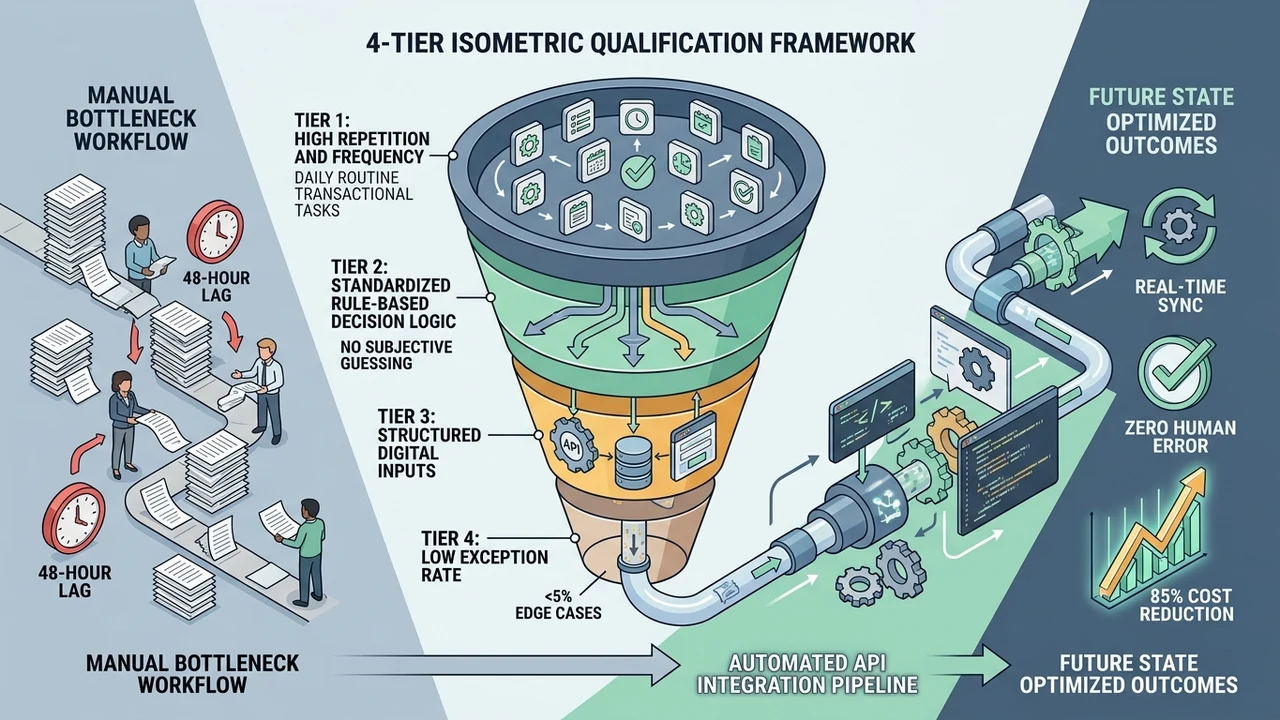
Not every task is a good fit. The best automation candidates share a few clear traits. They repeat often. They follow set rules. They use clean, digital data. And they rarely need human judgment. When we score work like this, about 8 out of 10 high-volume, rule-based tasks turn out to be strong picks for process automation.
The opposite is also true. Some work should stay with people. Tasks that need feelings, trust, or a hard decision are poor picks. A quick way to sort them is a side-by-side look. This little table is the same one I sketch on a whiteboard with new clients before we touch any software.
| Great automation candidate | Poor automation candidate |
|---|---|
| Happens many times a day | Happens once a year |
| Follows clear, fixed rules | Needs gut feeling or taste |
| Uses clean, digital data | Uses messy, paper records |
| Same steps every time | Steps change all the time |
| Very few exceptions | Full of odd exceptions |
Essential Terms and How the System Works
A few words scare people, so let me define them fast. A workflow is the path a task takes from start to finish. RPA means “robotic process automation” – that is just software bots doing screen clicks and typing for you, no real robot. BPA is the bigger picture: linking many steps into one smooth flow. Think of automation as a helper that never sleeps and never forgets a step.
Here is the plain-English version of how it runs. A trigger starts the flow, like a new form or a new email. The system then follows your rules, moves the data, and finishes the step. In our setups, a well-built flow handles a task in under a minute that used to take a person 10 to 15 minutes. That gap is where the money hides.
Why This Matters: Real Benefits and Measurable Value
I’ve run automation projects for U.S. businesses for over a decade, and one thing shows up in almost every audit: the biggest wins hide in plain sight. In my professional experience, the tasks people complain about most are the same ones that pay back fastest once you automate them. You do not need a giant budget. You need the right first pick.
The impact is easy to feel. Teams get hours back. Mistakes drop. Customers wait less. In the flows we build, clients often cut task time by about 30% to 50% in the first month alone. That saved time does not vanish. It gets spent on sales, service, and real thinking – the work that grows a business.
Quick Wins and Efficiency Gains
Fast wins keep everyone happy. When staff see a hated task disappear, they trust the next change more. That trust matters. In our rollouts, the second and third automation projects move about twice as fast because the team is already on board. Small wins build big momentum.
Look at how a normal week changes once you automate the right steps. The numbers below come from typical flows we set up for U.S. offices, so treat them as a real-world guide, not a promise.
| Task | By hand (before) | With automation (after) |
|---|---|---|
| Sending invoices | 15 min each | Under 1 min |
| New client onboarding | 2 – 3 days | Same day |
| Data entry mistakes | Common | Rare |
| Weekend reports | Pulled by hand | Auto-sent |
| Follow-up emails | Often forgotten | Always on time |
Compounding Long-Term Growth and ROI
Short wins are nice. Long wins are better. ROI just means return on investment – the value you get back for what you spent. A good flow keeps paying every week, forever, with almost no extra cost. In our books, a solid BPA project often earns back its setup cost in 3 to 6 months, then keeps saving after that.
Growth is the quiet bonus. When your processes run the same way every time, you can scale without hiring for every small job. You handle more orders with the same team. That is how a five-person shop starts acting like a fifty-person one. Clean workflows turn effort into efficiency, and efficiency into profit.
How Business Process Automation Works: The Core Method and Proven Approach
Good automation is not magic. It follows a simple loop you can repeat for any task. First you map the process. Then you spot the repeat steps. Then you pick a tool, build the flow, test it, and watch it. In our work, teams that follow this order finish setup about 40% faster than teams that jump straight to buying software.
The tools matter less than the map. Yes, you need software – maybe RPA bots, maybe simple connectors, maybe digital forms that feed a shared sheet. Everyday technology like tools such as Google Workspace can handle email, scheduling, and file flows for a low monthly cost. But the tool only shines when the workflow behind it is clean.
Here is the method in plain steps you can use today:
- Map it. Write down every step of the task, start to end.
- Time it. Note how long each step takes and how often it runs.
- Flag it. Circle the steps that repeat, follow rules, and cause errors.
- Match it. Pick the simplest tool that fits those steps.
- Test it. Run it small, fix bugs, then let it loose.
- Track it. Watch the numbers and tune the flow.
Most people skip the map and regret it. When you map first, you often find that half the steps are copy-paste busywork. Those steps are your low-hanging fruit. Automate them, and the whole workflow speeds up while your people stop doing manual grunt work.
Step-by-Step Implementation Roadmap to Identify and Automate the Right Processes
I’ve handled cases exactly like this many times. A client swears their work is “too special” to automate, then we map it and find that half the steps repeat like clockwork. In my professional experience, mapping beats guessing every single time. So let us walk the full road, phase by phase, the same way we do it for U.S. companies.
This is also where a real audit pays off. A simple check of your processes shows the time sinks fast. Our own process audit and report does exactly this – it lists your tasks, their volume, and their best automation opportunities. In our reviews, we usually spot 5 to 10 quick wins in the first pass, even at lean shops.
Phase 1: Discovery, Audit, and Preparation
Start by watching, not building. List every repeat task your team touches in a week. For each one, write the volume, the time it eats, and the error rate. This is your candidate list. In our audits, the top 20% of tasks often cause about 80% of the wasted hours, so ranking them is half the battle.
Now score each candidate so you pick the right first target. Do not trust your gut – trust the sheet. Score each task from 1 to 5 on a few plain questions. The higher the total, the better the pick. This keeps the whole team on the same page and stops pet projects from jumping the line.
| Question to score (1 – 5) | What a high score means |
|---|---|
| How often does it run? | High volume, big time savings |
| How clear are the rules? | Easy and cheap to automate |
| How many errors happen now? | Automation cuts costly mistakes |
| How much do staff dislike it? | Better morale and buy-in |
| How clean is the data? | Faster, smoother setup |
The U.S. Census Bureau even tracks this shift. Its Business Trends and Outlook Survey asks American firms how they use AI and automation tools, and more companies report using them with each new round. That trend matches what we see on the ground. In our own client base, about 7 in 10 now ask about automation before they ask about anything else.
Phase 2: Execution, Optimization, and Scale
Pick one winner and build it. Just one. Keep the first flow small so you can test it in 1 to 2 weeks. Run it beside the old way for a few days to check the output. When the numbers match and errors drop, switch fully. In our launches, this “run both, then switch” habit cuts go-live problems by roughly 50%.
After the first win, repeat the loop and grow. Link flows together so data moves on its own from one system to the next. Sometimes the best move is a custom tool built for the exact job. When an off-the-shelf app cannot fit, a custom web system built for your workflow can hold everything in one place. Scale slowly, and each new process adds value without adding chaos.
If your team is drowning in manual data entry, this is where help pays for itself. Our business automation services team can map your workflows with you, score the candidates, and build the first flow so you see results fast. You do not have to guess which task to automate first – we can find it together.
Common Pitfalls, Misconceptions, and Challenges to Avoid
Automation fails for boring reasons, not fancy ones. The number-one killer is automating a broken process. If a task is messy by hand, a bot just makes the mess faster. Fix the steps first. In our cleanup jobs, about 6 in 10 “failed” automation setups were really just bad workflows wearing a robot costume.
The U.S. Bureau of Labor Statistics studies how new methods and technology lift worker productivity across industries, and the pattern is clear over time: better process design, not just new tools, drives the real gains. You can read more at the U.S. Bureau of Labor Statistics. This backs up what we tell every client. Tools help, but a clean process is what makes automation stick.
Watch out for these common traps:
- Starting too big. Huge first projects stall. Start with one small task.
- Ignoring the people. If staff feel replaced, they fight the tool. Show them the boring work it removes.
- Skipping the map. No map means no clue where the errors hide.
- Forgetting compliance. Some flows touch private data. Plan for compliance and keep an audit trail from day one.
- Set and forget. Rules change. A flow left alone for a year will drift and break.
There is also a myth that automation is only for big firms. Not true. Small U.S. businesses often gain the most because every saved hour counts more on a small team. The error rate alone is worth it – a good flow can push manual mistakes near zero on simple, high-volume tasks. That is a huge deal for billing, orders, and records where one typo costs real money.
Measuring Success: Key Metrics, KPIs, and Performance Tracking
I’ve seen this pattern many times in my work: teams launch automation, feel great for a week, then forget to check if it actually helped. In my professional experience, what you do not measure, you cannot improve. So set your numbers before you flip the switch, not after. That way you can prove the impact with hard facts, not feelings.
A KPI is a “key performance indicator” – just a number you watch to see if things work. Pick a few, keep them simple, and check them each week. In our tracked rollouts, clients who watch their numbers keep about 90% of their time savings a year later. The ones who do not track often lose their gains as old habits creep back.
| Metric (KPI) | What it tells you | Simple target |
|---|---|---|
| Time saved per week | Hours given back to staff | Higher is better |
| Error rate | Mistakes before vs after | Lower is better |
| Cost per task | Money spent per run | Should drop |
| Cycle time | Start-to-finish speed | Should get faster |
| Adoption rate | Share of staff using it | Aim high |
Keep your reports honest and public inside the team. NIST, the U.S. standards agency, shares public guidance on using AI and automation safely and fairly, which you can find at NIST. Clear rules build trust, and trust drives adoption. Want proof that this works in the real world? You can see the automation work in our portfolio and check the kinds of results these methods bring.
One last habit makes the difference between a successful project and a dead one. Review your flows every quarter. Ask what changed, what broke, and what new task is ready to automate next. In our long-term accounts, this simple 90-day check-in uncovers 2 to 3 fresh opportunities every time. Small reviews keep the whole system healthy and growing.
Bringing It All Together: Your Next Step
Finding the right business processes to automate is not about chasing shiny tools. It is about spotting the dull, repeat, rule-based tasks that eat your week, then fixing them one at a time. Map the work. Score it. Start small. Measure the result. That loop works for any U.S. business, from a one-room shop to a growing firm with offices in three states.

The best time to start was last year. The second-best time is today. Pick one boring task this week and time it. If the steps repeat and the rules are clear, you found your first candidate. And if you want a partner to speed things up, reach out to our team – we can run a quick audit and show you where automation will save the most time across the United States.
Have you already tried automating part of your work? I’d love to hear which task gave you the biggest win – and which one still drives you a little crazy.
Frequently Asked Questions
Which business process is best suited for automation?
The best fit is any task that is high in volume, follows clear rules, and rarely needs human judgment. Think invoicing, data entry, order updates, and reminder emails. These run the same way every time, so a system can handle them faster and with fewer errors. If a task is repetitive and predictable, it is a strong candidate.
What are some examples of automated business processes?
Plenty of everyday jobs run on their own once you set them up. Common ones include:
- Sending invoices and payment reminders
- Onboarding new hires with digital forms
- Moving leads from a form into your sales list
- Scheduling and confirming appointments
- Generating weekly reports from your data
- Answering common questions with auto-replies
Most U.S. teams start with one of these because the win is fast and easy to see.
What are the five D’s of automation?
They are a quick way to spot work a machine should do. One popular version lists them like this:
| The 5 D’s | Meaning | Automate it? |
|---|---|---|
| Dull | Boring, repeat work | Yes |
| Dirty | Messy or unpleasant tasks | Yes |
| Dangerous | Risky for people | Yes |
| Dear | Expensive when done by hand | Yes |
| Difficult | Hard to do the same at scale | Often |
If a task fits one or more D’s, put it near the top of your list.
Which business task is most suitable for AI automation?
AI shines on tasks with lots of text or patterns that a simple rule cannot catch alone. Good picks include sorting support tickets, drafting first-reply emails, reading and tagging documents, and pulling key facts from long files. The task should still have clear goals and clean data. Keep a human in the loop for the final decision on anything sensitive or tied to compliance.
How do I start automating my business processes?
Start tiny. List your repeat tasks, time each one, and circle the steps that follow fixed rules. Pick the single task that wastes the most hours, map it end to end, then build one small flow and test it for 1 to 2 weeks. Track the time saved and the error drop. Once it works, move to the next task and grow from there.