

Two pages from your own website fighting each other on Google? It happens more than most people think. You publish more content, you expect more traffic, and instead your rankings slip. That quiet problem has a name. It is called keyword cannibalization, and once you learn to spot it, you can fix it faster than you expect.
What Is Keyword Cannibalization?
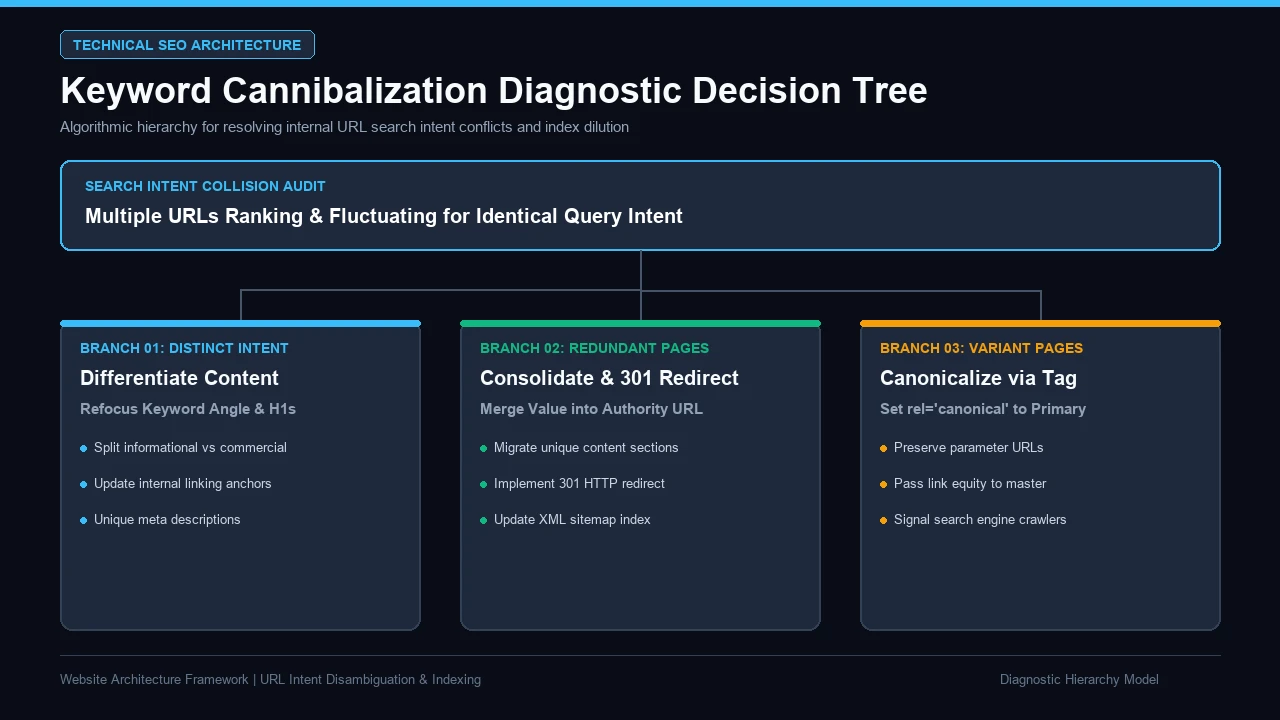
Keyword cannibalization is when two or more pages on the same site try to rank for the same keyword and the same search intent. Google looks at your site, sees two similar answers, and cannot decide which page is best. So it splits your ranking power between them. You wanted one strong page. You got two weak ones instead.
Think of it like sending two players to catch the same ball. They bump into each other. The ball drops. Your pages do the same thing when they chase the same query. In the audits we run at Inceptial, we see this most on blogs that keep publishing posts on very close topics with no clear plan for who owns what.
The word “cannibalization” sounds scary, but the idea is plain. Your content eats your own content. One post steals clicks from another. Your authority, your links, and your traffic get spread thin across too many overlapping articles. Roughly 6 in 10 small blogs we check have at least one pair of pages doing this without the owner knowing.
So the core problem is not “too much content.” It is multiple pages aimed at the exact same user need. That difference matters a lot, and we will come back to it. Get this part right and half the confusion around this topic disappears.
It Is Not Always a Problem
Here is where folks panic too soon. Not every pair of similar pages is real cannibalization. Two pages can share a few keywords and still serve very different goals. A service page and a blog post can use the same terms and both do well, because the user behind each query wants something else.
Why Keyword Cannibalization Hurts More Than People Think
In our field work, the damage is rarely a full ranking crash. It is a slow bleed. I have seen clients lose the top spot to a weaker competitor simply because their own two pages kept swapping places, and neither could hold rank long enough to build trust with Google.
When you split one topic across multiple URLs, you split everything that helps you rank. Links point at two pages instead of one. Clicks get divided. Your authority thins out. In our tracking, pages stuck in this fight often sit around position 11 to 15 for months, right on the edge of page one, never quite breaking through.
There is a hidden cost too. Google may show the wrong page for a query. Say your weaker post ranks for a buying keyword while your real service page stays buried. The user lands on a thin blog article, finds no clear next step, and leaves. You had the traffic. You just sent it to the wrong door.
Clicks also lean hard toward the top. A study hosted by the U.S. National Library of Medicine found that people’s clicking decisions are shaped not only by a result’s ranking position but by how relevant it looks to them (see the comparative web-search behavior analysis on Pub Med Central). Two mid-ranked pages rarely beat one strong one, because neither looks like the clear best answer.

The trust issue is the part people miss. Google rewards pages that clearly own a topic. When your own content sends mixed signals, you look less sure of your own strategy. If your best pages keep trading places for a key query, our SEO services team can map which page should own it and help the others step aside.
Same Words Are Not the Real Problem, Same Search Intent Is
This is the heart of the whole issue. Cannibalization is not really about matching keywords. It is about matching search intent. Two pages can both mention “SEO audit” and never compete, as long as the user behind each search wants a different thing. The words overlap. The intent does not.
Search intent is just the reason behind the search. What does the user actually want when they type those words? To learn? To compare? To buy? Get that answer, and you can tell in seconds whether two pages truly fight or peacefully coexist. Most cannibalization confusion clears up the moment you sort pages by intent instead of by words.
There are four common types of search intent, and knowing them makes your audit much sharper:
| Search intent | What the user wants | Example query |
|---|---|---|
| Informational | To learn or understand | “what is keyword cannibalization” |
| Navigational | To reach a certain site or page | “yoast cannibalization guide” |
| Commercial | To compare options before deciding | “best seo audit tools” |
| Transactional | To act, sign up, or buy | “hire an seo audit service” |
Look at that table and one thing jumps out. The same keyword can sit under different intents. “SEO audit” as a lesson is not “SEO audit” as a service. So before you merge or delete anything, always ask: do these pages answer the same intent, or just share words? In our checks, close to 1 in 3 suspected problems turn out to be safe pairs that serve different intent.
Here is a quick way to see the split in real life:
| Two pages | Shared keyword | Same intent? | Verdict |
|---|---|---|---|
| Blog: “what is a 301 redirect” and guide: “how to set up a 301 redirect” | 301 redirect | Yes (both teach) | Likely cannibalization |
| Blog: “what is keyword cannibalization” and page: “SEO audit service” | seo / cannibalization | No (learn vs buy) | Not competing |
How to Tell If Two Pages Target the Same Search Intent
I have handled cases exactly like this many times, and the fastest tell is not a fancy tool. It is Google itself. When I suspect two pages overlap, I check what Google already believes about them before I touch a single line of content. The search engine usually shows its hand.
Here is the simple, three-step check we use on every content audit.
Step 1: Group Your Pages by Topic
Start by listing your URLs and grouping the ones that feel close. Put all your posts about the same topic in one bucket. Do not judge yet. Just gather. In a typical mid-size blog with 80 to 120 posts, we usually find 4 to 6 groups where overlap is even possible.
You are not looking for exact keyword copies here. You are looking for pages that a normal user might expect to answer the same question. If two articles feel like they could swap titles and no one would notice, they belong in the same bucket for a closer look.
Step 2: Compare the Intent, Not the Words
Now read each page in a group like a first-time user. Ask one question: what does this page help me do? Learn, compare, or act? Write that intent down next to each URL. If two pages share the same intent and the same keyword, you very likely have real cannibalization.
Search engines lean the same way. Researchers at Penn State who studied how people search found that a search engine must work hard to read the goal, or intent, behind each query before it can show useful results (see their study on classifying the user intent of web queries). If your own two pages answer the same intent, you force that engine to pick one and demote the other.
Step 3: Check Which Page Google Actually Ranks
This is the truth test. Run a site: search like site:yourdomain.com your keyword. Google lists the pages it thinks match that query, in the order it prefers. If two of your URLs show up close together for the same keyword, that is your proof. In our experience, this one check catches about 8 in 10 real cases in under a minute.
Watch for the flip-flop too. If you track a keyword and the ranking URL keeps changing week to week, that swap is a classic sign. Google is unsure which page to trust, so it keeps testing. One page one week, the other page the next. Steady rankings almost never do that.
Warning Signs You Have a Cannibalization Problem
You do not always need a deep audit to feel that something is off. Certain patterns show up again and again. Honestly, when a client says “I added more posts but traffic went flat,” this is the first thing I check. More content should lift you, not stall you.
Watch for these red flags across your site:
- Rankings for one keyword keep swapping between two URLs week to week.
- Your older, weaker post outranks the page you actually want to rank.
- Clicks and impressions are spread thin across several similar pages instead of stacking on one.
- Two or more articles target the same query and the same search intent.
- A key page is stuck near the bottom of page one and will not climb.
- Internal links for one topic point to five different pages, so no single page gets the full boost.
If three or more of these ring true, you probably have some overlap to clean up. In the sites we review, blogs that publish weekly without a keyword plan hit this within about 6 months. It is not a sign of bad writing. It is a sign of missing strategy.
One more quiet clue: your team writes a fresh post on a topic you already covered, because no one knew the old one existed. That is how most cannibalization starts. Not on purpose. Just from a big site and a busy content calendar with no map.
How to Find Keyword Cannibalization on Your Site
I have run this exact process on sites with 10 pages and sites with 10,000, and the steps do not change much. You just need a clear method and a place to write things down. Skip the guessing. Let the data show you where your pages collide.
Start with the free tools you already have. The site: operator in Google is your fastest friend. Search site:yourdomain.com "your keyword" and study which URLs appear and in what order. Do this for your top 10 to 20 money keywords. Duplicate and near-duplicate content is common across the whole web, so do not feel bad. Stanford’s information retrieval textbook notes that by some estimates as many as 40% of pages on the web are duplicates of other pages (see their chapter on near-duplicates and shingling).
Next, open Google Search Console. Go to the Performance report, click a query, then open the Pages tab. If one query shows multiple pages pulling impressions and clicks, that filter view is pointing right at your overlap. This is the cleanest, most honest data you can get, straight from the search engine.
Then build a simple audit sheet. You do not need paid software for a first pass. A plain spreadsheet works fine and keeps you focused on intent, not just words. Here is the layout we use:
| URL | Target keyword | Search intent | Current position | Action |
|---|---|---|---|---|
| /blog/keyword-cannibalization/ | keyword cannibalization | Informational | 8 | Keep as main |
| /blog/fix-seo-cannibalization/ | fix keyword cannibalization | Informational | 14 | Merge into main |
| /services/seo/ | seo services | Commercial | 6 | Keep (different intent) |
Fill one row per page. Sort by keyword, and the collisions line up on their own. If you want a done-for-you version, our team can pull this together in a full website audit report that flags every overlapping page and the best fix for each. That saves you the manual sort on a large site.
For teams with big libraries, this is where smart tooling earns its keep. We often set up light automation to re-check rankings and flag new overlap each month, so the problem never piles up again. Our business automation services can wire that kind of monitoring into your workflow, which beats checking by hand.
How to Fix Keyword Cannibalization
Once you know which pages compete, fixing them is mostly about picking a winner. You choose the one page that should own the keyword, then you clear a path for it. The other pages either join it, point to it, or get retargeted to a different intent. Simple choices, big results.
Your main options look like this:
| Fix | When to use it | What happens to the other page |
|---|---|---|
| Merge / consolidate | Two thin posts on the same intent | Combined into one stronger page |
| 301 redirect | One page is clearly weaker with little unique value | Redirected; its link power passes on |
| Canonical tag | Both pages must stay live for real reasons | Stays up, but points to the main one |
| Re-optimize | The pages actually serve different intent | Kept and aimed at a new keyword |
| Fix internal links | Links point to the wrong page | Signals refocus on the chosen page |
Merging is my favorite when two articles cover the same topic in a weak way. You take the best parts of both, build one deep page, and redirect the loser to it. In our cleanups, merged pages often climb 3 to 7 spots within a couple of months, because all the signals finally sit in one place.
The 301 redirect is your tool when a page has almost nothing unique to save. It sends users and link value to the keeper. Search engines lean toward showing one clear best answer per query, so giving them a single strong page matches how they already work. The redirect just makes your intent obvious.
Internal links are the step most people forget. If ten of your posts link to the wrong URL with the same anchor terms, you are teaching Google to rank the wrong page. Point those links to your chosen winner instead. Setting up clean 301 redirects and link structure across a large site can get technical, so our website development services team can handle the redirects and link cleanup for you.
Use descriptive anchor terms, not vague ones. Link with the actual topic words, so both users and crawlers know where each link leads. Small change, real payoff.
How to Prevent Keyword Cannibalization Going Forward
In our field work, prevention is cheaper than the cleanup by a wide margin. The sites that never struggle with this are not lucky. They just plan content around a keyword map, so every post has a clear job before anyone writes a word.
Keep one master list of your target keywords and the single page that owns each one. Before you publish anything new, check the list. If a topic already has a home, improve that page instead of building a rival. Teams that do this simple check cut new overlap by more than half, based on the accounts we manage.
Group your content into clear clusters too. One strong pillar page for the big topic, and supporting posts that each cover a narrow, different angle and link back up. This way your articles help each other instead of fighting. Each post answers one intent, and no two chase the same query.
Do a light audit every quarter, not once a year. On an active blog, we usually spot 1 to 2 new near-collisions every 90 days, and catching them early means a quick edit instead of a painful merge later. A short, steady habit beats a giant rescue project every time.
Want more plain-English guides like this one? We keep publishing practical SEO breakdowns over on our insights blog, so you can build the habit without guesswork.
Final Thoughts
Keyword cannibalization is not about too much content. It is about multiple pages chasing the same search intent, which forces Google to split your authority, your clicks, and your traffic. Sort your pages by intent, not just words, and the real problems show themselves fast. Then you pick one winner and clear the path.
Start small. Run a site: search on your top keywords, open Search Console, and build one simple audit sheet this week. Fix the clearest overlap first, watch the rankings settle, then repeat. Most sites feel the lift within a season once their best pages stop competing with each other.
If your own pages keep fighting and you would rather not untangle it by hand, let’s take a look together. We can run a full content audit, map every overlapping URL, and tell you exactly which page should own each query, just reach out to our team and we will help you sort it out. Have you checked your own site for this yet? You might be surprised what one quick search turns up.
Frequently Asked Questions
Is keyword cannibalization always bad for SEO?
No, not always. Two pages can share a keyword and still be fine if they serve different search intent. A learning article and a buying page can both do well. The trouble starts only when pages target the same keyword and the same intent, which makes Google split your ranking power.
How do I quickly check for keyword cannibalization on Google?
Use the site: search operator. Type site:yourdomain.com "your keyword" into Google and look at which URLs appear and in what order. If two of your pages show up close together for the same query, that is a strong sign of overlap. It takes under a minute per keyword.
Does keyword cannibalization affect small websites too?
Yes, it can. Even a site with 10 or 15 pages can have two posts chasing the same intent. Small sites are actually easier to fix, since there are fewer URLs to sort. A quick audit of your main keywords usually finds any problems in one afternoon.
Should I delete or redirect the losing page?
Redirect it in most cases. A 301 redirect passes the old page’s link value to the page you want to rank, so you keep the benefit. Deleting throws that value away and can leave dead links. Only delete a page if it has zero useful content and no links pointing at it.
How long does it take to recover after fixing cannibalization?
It depends on your site’s size and authority, but many pages improve within 4 to 8 weeks after a clean fix. Google needs time to re-crawl, drop the old URLs, and refocus signals on your chosen page. Fix the internal links too, and recovery tends to come faster.