

Your site looks fine on the screen. But traffic keeps slipping, month after month, and you cannot see why. A technical SEO audit is supposed to explain it. The trouble is simple: most audits just hand you a long list of broken things and then stop. That list is a starting point. It is not an answer, and it will not grow your business on its own.
What Is a Technical SEO Audit?
A technical SEO audit is a health check for your website. It looks under the hood. Not the words on the page, but the wires behind them. It checks how Google finds your pages, how fast they load, and whether search engines can read your site at all. When these basics fail, even great content stays invisible.
Think of it like a doctor visit for your site. A good check does not just say “you are sick.” It tells you what is wrong, how serious it is, and what to do next. In our own work, close to 8 out of 10 sites we test have at least one hidden problem the owner never knew about. That is a big number for something people assume is “fine.”
The audit looks at your server, your code, your URLs, and your page structure. It checks if your important pages are indexed. It checks site speed, mobile fit, crawl access, and broken links. Each piece is a small clue on its own. Put them together and they show the real health of your whole website.
Here is the catch that trips people up. A file full of red errors feels scary, and scary is not the same as useful. You need to understand which problems hurt your business today and which ones can wait a month. Sorting that out is the part most cheap audits skip. And it is the part that matters most.
Why “What Is Broken?” Is Only Half the Story
I have handled hundreds of audits, and I keep seeing the same pattern. A client gets a report with 300 issues, panics, and then fixes the wrong ten first. A raw error list, all by itself, fixes maybe 2 out of every 10 problems that actually move rankings. The rest is noise dressed up as work.
“What is broken?” is only the first question. It is the easy one. Any free tool can spit out that list in under a minute. The hard part is everything that comes after the list.
A real audit answers more. It tells you why each issue matters. It tells you which fix brings the most traffic back. It tells you how long the work will take, and what it costs you if you sit and wait. Data without a plan just makes people anxious. A plan turns that same data into money.
Look at speed as an example. A tool might flag that a page is slow. Okay. But slow how, and slow for who? On mobile or on desktop? A weak audit says “slow” and moves on. A strong audit says “this checkout page loses phone buyers, fix it first, and here is the roadmap to do it.” That gap between a flag and a plan is the whole game.
Honestly, this is where a lot of money leaks out of small businesses. They pay for a scan, get a scary PDF, and freeze. Nothing gets fixed because nobody explained the order. If your last report left you more confused than before, our SEO services can turn that pile of errors into a simple, ranked to-do list you can act on.
The Real Questions Your Audit Should Answer
A good audit is not a test you pass or fail. It is a set of answers. Before you trust any report, check that it does more than count problems. It should read like advice from a professional who has seen your kind of site many times. If it only lists broken items, you got half a service for a full price.
Here is the difference laid out plainly. The weak version stops at symptoms. The strong version connects each symptom to your business and to a next step you can actually take.
| The weak audit asks | The strong audit answers |
|---|---|
| What is broken? | What is broken, and how it hurts traffic |
| How many errors? | Which errors to fix first |
| Is the page slow? | Who it drives away, and by how much |
| Are pages indexed? | Why Google skipped them, and the fix |
| Any server problems? | The exact code or setting to change |
See the shift? Every row moves from a fact to an action. That is what you are paying for. In our experience, an audit built this way gets fixed 3 to 4 times faster than a plain error dump, because the team never has to guess what to do next.
A strong audit should also answer these plain questions for your site:
- Can Google even find my pages? This is about crawl access and robots rules.
- Are the right pages showing in search? This is about being indexed, not blocked.
- Is my site fast enough on phones? This is about load time and Core Web Vitals.
- What is costing me the most traffic right now? This is your priority list.
- What is the plan, in order, with dates? This is the roadmap.
If your audit cannot answer all five, it is not finished. It is just a snapshot. And a snapshot never fixed anything.
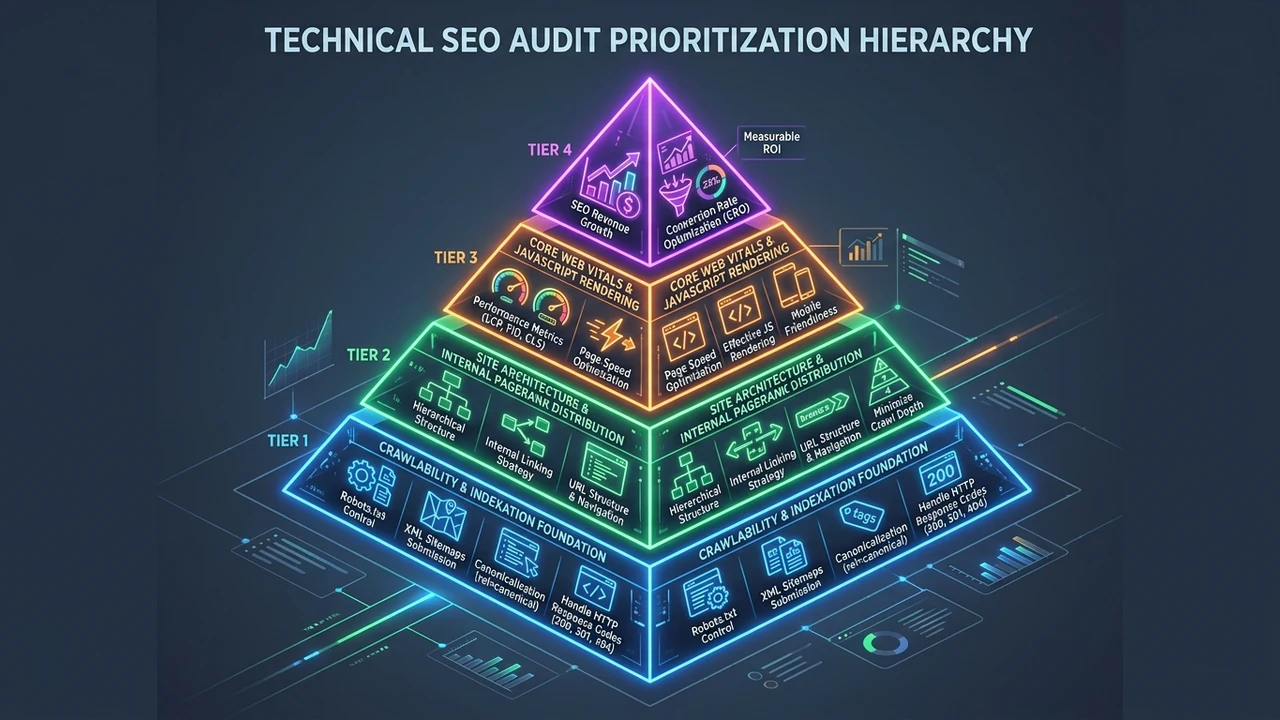
The Most Common Technical Issues We Find
In my professional experience, the same handful of problems show up on most sites, no matter the industry. People expect exotic bugs. The reality is boring and repeatable: blocked pages, slow loads, and dead links account for a huge share of the damage. Roughly 7 out of 10 first-time clients we audit have at least one of these three, and many have all three at once.
Let me walk through the usual suspects. None of these are hard to grasp once you strip out the jargon.
| Technical issue | What it means (simple) | Why it matters |
|---|---|---|
| Blocked by robots file | You told Google “do not enter” by mistake | Pages never show in search |
| Weak Core Web Vitals | The page is too slow or jumpy | Visitors leave, rankings slip |
| Not mobile friendly | The site breaks on phones | Most users cannot use it |
| Broken links (404s) | Dead-end pages that go nowhere | Bad experience, wasted crawl budget |
| Server errors (5xx) | The site fails to answer | Pages fall out of Google |
| Duplicate URLs | The same content on many links | Google gets confused, splits rankings |
Crawl and indexing problems
If Google cannot crawl your site, nothing else you do will help. The bot has to reach the page before it can rank it. A single wrong line in your robots file can hide your whole website. I have seen a brand-new site stay invisible for weeks because one setting said “block everything.” One line. Weeks of lost traffic.
Being indexed is the next step after crawling. A page can be crawled but still left out of the search list. Thin content, duplicate pages, or a stray “noindex” tag are common causes. Your audit should show exactly which of your URLs are missing and why.
Site speed and Core Web Vitals
Speed is not a bonus anymore. It is a ranking signal. Google measures it through Core Web Vitals, three simple checks on how a page feels to a real user. Good scores are clear targets: LCP under 2.5 seconds for loading, INP under 200 milliseconds for response, and CLS under 0.1 for visual steadiness. Miss these and both people and Google notice.
The fix is rarely one big thing. It is usually many small ones: heavy images, bloated code, slow server replies. When the fix needs real rebuilding, our website development team can rework the pages so they hit those targets without breaking your design.
Mobile and broken links
Phones run the web now. If your site looks messy or hard to tap on mobile, you lose those visitors fast. Broken links make it worse. Every 404 is a tiny dead end that annoys people and wastes Google’s crawl time. Clean these up and both user experience and rankings tend to rise together. It is some of the easiest, highest-value optimization you can do.
Turning Audit Data Into a Clear Roadmap
Raw data is not the goal. A plan is. The best part of any audit is the moment the messy list becomes a clean roadmap. This is where a pile of issues turns into “do this, then this, then this.” Without that order, teams burn hours on tiny fixes while the big leaks keep dripping.
I sort every audit into three simple buckets, and I suggest you do the same. It keeps everyone calm and focused.
- Fix now: Problems that block Google or crash the site. Blocked crawl, server errors, dead key pages. These bleed traffic daily.
- Fix soon: Speed issues, weak mobile fit, messy structure. Big wins, but the site still works while you plan.
- Fix later: Small optimization touches. Nice to have. Low risk if they wait a while.
This order is not a guess. It follows impact. In practice, the “fix now” group is usually only 10% to 20% of the total list, yet it often drives the majority of the recovery. You get most of the reward from a small slice of the work. That is why the roadmap matters more than the raw count of errors.
A good roadmap also puts a name and a date on each task. Who does it, and by when. Vague plans die quietly. A dated plan gets done. When we hand a client their audit report, every item has an owner and a deadline, so the fixes actually ship instead of sitting in a folder. You can see how we lay that out on our audit report page.
Have you looked at your last audit this way? Try it. Split the list into now, soon, and later, and watch how much lighter it feels. Most of the panic comes from treating a 300-item list as one giant emergency. It never is.
Automated Tools vs a Professional Audit
I have run both automated scans and hands-on audits for years, and here is the honest truth: tools are fast but blind. They catch the obvious stuff and miss the story. An automated tool will tell you a page is slow. It will not tell you that this exact page is your top money-maker and should jump to the front of the line.
The gap is bigger than most people think. Data from the U.S. government’s own Performance.gov review shows only 41% of federal websites fully pass mobile-friendliness and just 14% are set up well for search. And note this: those official site scans only check homepages, not the inside pages. Even the government’s automated checks admit they miss most of the website. A machine sees the front door. It does not walk the halls.
That does not mean tools are useless. Far from it. AI helpers like Claude and modern crawlers can sort huge amounts of data in seconds. I use them every day to speed up the boring parts. But they are the start of the work, not the end. A person still has to read the results against your real business goals.
| Automated tool | Professional audit | |
|---|---|---|
| Speed | Minutes | A few days |
| Finds surface errors | Yes | Yes |
| Explains why it matters | No | Yes |
| Gives a priority roadmap | Rarely | Yes |
| Knows your business | No | Yes |
| Best for | Quick health checks | Real decisions |
The smart move is to use both. Let the automated checks run often and cheap. Bring in a human when you need a plan. If you want the machine part handled for you, so site health is watched around the clock, our business automation services can set up steady, hands-off monitoring that flags trouble before it spreads.
How Often Should You Run a Technical Audit?
There is no single right answer, and anyone who gives you one is guessing. The pace depends on your site. A small five-page business site does not need the same schedule as a store with ten thousand URLs. Match the audit rhythm to how fast your site changes.
The mobile shift makes regular checks more important than they used to be. According to Pew Research Center, 91% of U.S. adults now own a smartphone, and 16% rely on that phone as their only way to get online. If your site quietly breaks on mobile, you are not losing a slice of visitors. You are losing most of them. That is why mobile problems sit near the top of every roadmap I build.
Here is a simple guide I give clients. Adjust it to your own pace, but do not skip the schedule entirely.

| Site type | How often to audit |
|---|---|
| Small business site (few pages) | Every 6 months |
| Growing blog or content site | Every 3 months |
| Large store (many URLs) | Monthly, plus automated checks |
| Right after a redesign or move | Straight away, no waiting |
The one rule I never bend: audit right after any big change. A redesign, a platform switch, a server move. These are the moments when broken links and lost pages sneak in. Skipping the post-change check is how a fresh, pretty site ends up dropping 20% or more of its rankings in a single month without anyone noticing until it is too late.
What Your Business Really Gets From a Better Audit
I have watched a single good audit change a company’s year. Not because it found rare bugs, but because it finally told the owner what to do first. When the roadmap is clear, fixes ship, traffic returns, and the site starts earning again. The audit itself does not make money. The action it unlocks does.
The stakes here are real and rising. A Digital.gov analysis of U.S. government sites found mobile traffic jumped from just 13% of visitors in 2013 to 58% in 2023, while 47% of all visitors now arrive through organic search. Read that again. Nearly half your future customers may be finding you through Google, on a phone. A site that fails the technical basics loses both doors at once.
So what does a strong audit actually hand your business? More than a report. It gives you:
- A clear picture of site health, so you stop guessing.
- A ranked roadmap, so your team fixes the big leaks first.
- Better rankings and traffic, because Google can finally read and trust your pages.
- A better user experience, because fast, working pages keep people around.
- Peace of mind, because you know what is going on under the hood.
That last one is underrated. A lot of my clients say the biggest win was simply not worrying anymore. They stopped wondering “is something quietly broken?” because the audit, and the steady checks after it, answered that for good.
If your site feels stuck and you cannot tell why, let us take a look together. We can run the audit, explain what matters in plain words, and build the plan with you. You can reach out to our team whenever you are ready, and we will start with a real conversation, not a sales pitch.
Final Thoughts: Your Audit Should Hand You a Plan
A technical SEO audit should never end at “here is what is broken.” That is the question, not the answer. The report that helps you is the one that tells you why it matters, what to fix first, and how the plan unfolds week by week. Everything else is just a list, and lists do not grow rankings.
So next time someone hands you an audit, ask one thing: does this give me a roadmap, or just a pile of errors? If it is only the pile, you are missing the half that counts. A good audit turns confusion into a clear next step. That is the whole point, and it is what separates real help from a scary PDF.
I would love to hear about your own site. Have you had an audit that actually gave you a plan, or one that just left you staring at red errors? Drop a comment and tell me what you found. And if you want a real person to read your site the right way, we are here to help.
Frequently Asked Questions
What is a technical SEO audit in simple words?
It is a health check for the hidden parts of your website. It looks at speed, code, crawl access, mobile fit, and whether your pages are indexed by Google. It does not check your writing. It checks whether search engines can find, read, and trust your site. A good one also tells you what to fix first, not just what is wrong.
How long does a technical SEO audit take?
An automated scan takes minutes. A full professional audit usually takes a few days, because a person has to read the data, connect it to your business, and build the roadmap. Bigger sites with many URLs take longer. In our experience, a small business site is done in about 2 to 3 days, while a large store can take a week or more.
Can I do a technical SEO audit myself with free tools?
Yes, you can start with free tools, and you should. They will catch broken links, slow pages, and basic crawl errors. The hard part is reading the results. A tool shows the what. It rarely shows the why or the order. Most people find the list, feel lost, and stop. That is the exact spot where a human audit earns its keep.
How often should I audit my website?
It depends on how fast your site changes. A small site is fine every 6 months. A busy blog or store should check every 3 months or run automated checks monthly. Always audit right after a redesign, a move, or a big content push. These are the moments when pages go missing and links break without warning.
What is the difference between a technical audit and an audit report?
The audit is the work: the testing, crawling, and checking. The audit report is the finished document you get at the end. A weak report just lists issues. A strong one ranks them, explains why each matters, and gives you a dated roadmap. If you want to see what a clear, action-first report looks like, take a look at our audit report example and compare it to your last one.